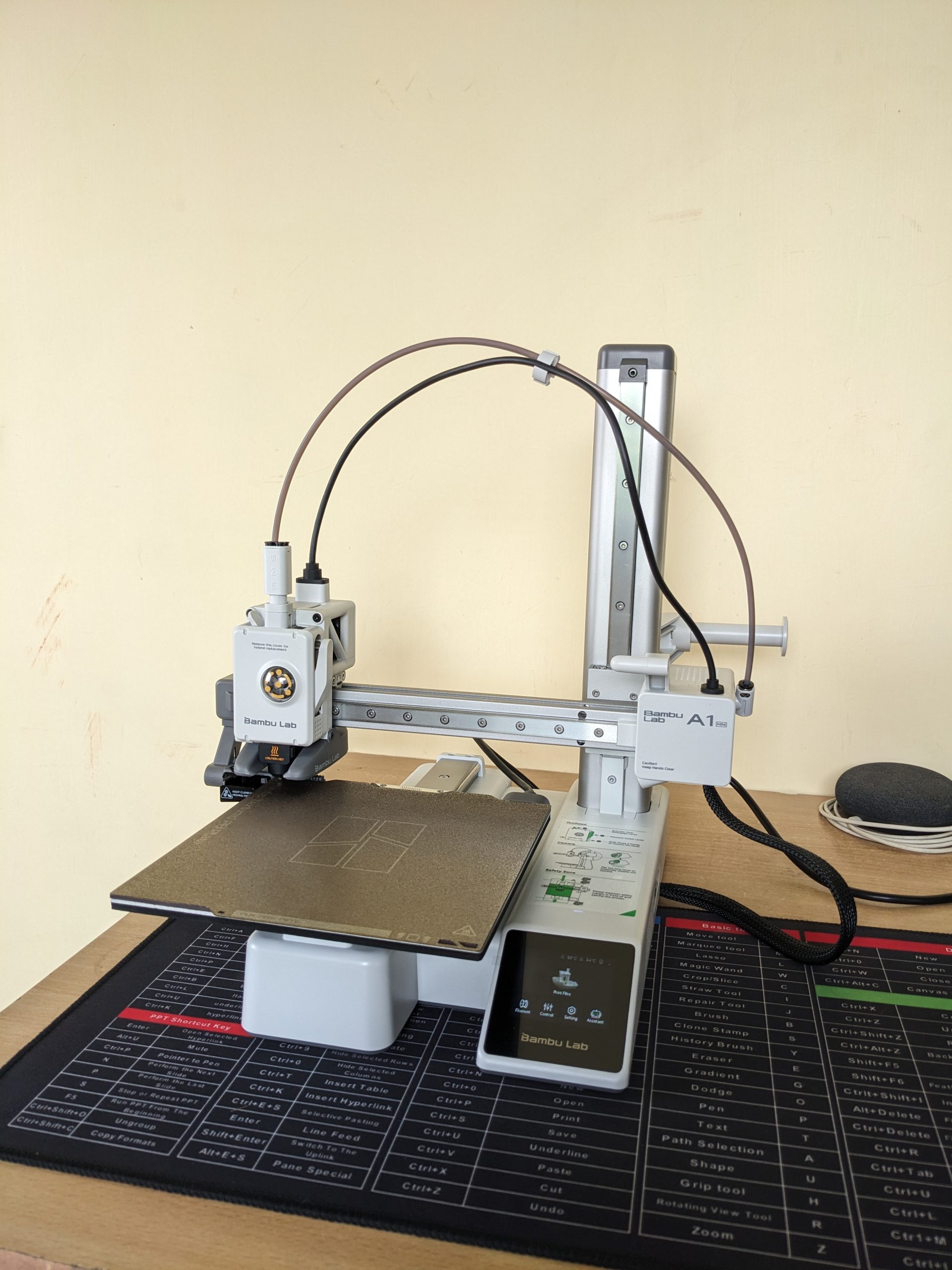
Thinking about getting into 3D printing? If you’re anything like me, you’ve probably spent hours watching videos, reading reviews, and trying to figure out which printer is the best for a beginner. After a lot of research, I decided to pull the trigger on the Bambu Lab A1 Mini, and I’m so glad I did. I want to share my entire experience, from the moment I clicked “buy” on Robu.in to the moment the printer arrived at my doorstep.
Why the Bambu Lab A1 Mini is a Top Recommendation for Beginners
When I started my search, I knew I wanted a printer that was easy to use, reliable, and didn’t require constant tinkering. The Bambu Lab A1 Mini checked all those boxes and more. Here’s a quick rundown of what makes this printer stand out from the competition:
Effortless Setup and Calibration: This was a huge selling point for me. The A1 Mini has a fully automatic calibration system. It handles the bed leveling, Z-offset, vibration resonance, and pressure advance on its own. It’s a true “plug-and-play” experience, which is a massive relief for a first-timer.
Insane Speed: You’ll be amazed at how fast this printer is. With a maximum toolhead speed of 500textmm/s and an acceleration of 10,000textmm/s2, you can get your prints done in a fraction of the time compared to other entry-level printers. Less waiting means more creating!
Quiet Operation: One of the most common complaints about 3D printers is the noise. The A1 Mini’s active motor noise canceling feature makes it surprisingly quiet. This is great if you plan to have it in a shared living space or a home office.
Smart and Reliable: The printer is packed with sensors that prevent common printing failures. The filament run-out and tangle sensors, along with the power loss recovery feature, mean your prints are protected from unexpected issues.
In my opinion, the Bambu Lab A1 Mini is the perfect machine for anyone who wants to jump into 3D printing without the steep learning curve. It’s a solid investment that delivers on its promises.
My Experience Buying from Robu.in
As a maker in India, finding a reliable supplier for high-tech gadgets can be a challenge. I stumbled upon Robu.in and was immediately impressed by their extensive catalogue of electronics, robotics, and 3D printing supplies.
The website was easy to navigate, and finding the Bambu Lab A1 Mini was a breeze. The checkout process was straightforward, and they provided multiple secure payment options, which gave me confidence in my purchase.
Because my location is on the outskirts of the city, I expected the delivery to take a bit longer. However, the wait was completely worth it. The best part? The courier service. My package was handled by BlueDart, and I was really impressed with their service. Despite some online reviews mentioning mixed experiences, my personal delivery with them was great. The package was in perfect condition, and the delivery person was very professional and ensured it was handed over to me safely. This kind of reliable courier service is crucial when you’re buying a delicate and expensive piece of equipment.
What’s Next? Stay Tuned!
The printer is here, and I’m itching to get it unboxed and set up! I’m planning to document my entire experience, from the unboxing to my very first prints, on my new YouTube channel.
I’ll be sharing an in-depth unboxing video soon, where you’ll get a close-up look at the Bambu Lab A1 Mini and all its components. If you’re considering this printer, or just want to follow along on my 3D printing journey, be sure to subscribe to my new YouTube channel and hit the notification bell.
My experience with Robu.in and BlueDart has been excellent, and I can confidently recommend them. Now, it’s time to fire up this printer and see what it can do!
If you’ve followed my previous blog post, you’ll know I’ve been deep into building my own DIY smart home ecosystem. My goal is to create a fully customized, open-source-powered “brain of the house,” from automatic door locks to intelligent climate control. It’s been a rewarding challenge, but as my little IoT devices have multiplied, I’ve realized something: they’re not exactly winning any awards for style.
Right now, my creations are a mess of wires and circuit boards, functional but far from a finished product. I knew I needed to take the next step, to bridge the gap between tech-nerd-in-a-garage and home-automation-pro. That’s why I’m diving headfirst into the world of 3D printing. This isn’t just a new hobby; it’s the key to turning my chaotic prototypes into sleek, professional-looking devices.
The Plan: A Beginner’s Guide to My 3D Printing Journey
My journey is starting right at the beginning, and I’m sharing every step to help others who might be considering the same path.
Step 1: The Great Printer Hunt
This is probably the most crucial and overwhelming part. The sheer number of 3D printers on the market is mind-boggling! My top priority is finding an affordable, user-friendly FFF (Fused Filament Fabrication) printer that won’t require a degree in engineering to operate. I’m currently torn between popular beginner models like the Creality Ender 3 and the Bambu Lab A1, both known for their active communities and reliability.
Step 2: From Idea to Model
A 3D printer is just a fancy paperweight without a digital design. I’m already starting to explore 3D modeling software. For now, I’ll be using free, intuitive tools like Tinkercad to create simple enclosures for my IoT sensors. As I get more comfortable, I plan to tackle more advanced software like Fusion 360 to bring more complex designs to life. The feeling of designing something from scratch and watching it take shape layer by layer… that’s the dream.
Step 3: Picking the Perfect Plastic
Who knew there were so many types of plastic? I’m learning about different filaments and their uses. For a beginner, PLA (Polylactic Acid) seems to be the clear winner. It’s easy to work with, less prone to warping, and biodegradable—a great choice for my initial projects. Once I master PLA, I’ll move on to more durable materials like ABS for stronger, more robust enclosures.
Step 4: Time to Hit “Buy”
This is where the adventure truly begins! After weeks of research, I’ll finally be ready to purchase my first 3D printer and a few spools of filament. I’m also looking into essential accessories like a proper build plate and a good set of tools to ensure a smooth printing process.
Step 5: The First Print
My hands are already itching to hit the “print” button. I’ll probably start with something simple, maybe a small benchy or a basic enclosure for one of my temperature sensors. I know there will be failed prints and frustrating moments, but that’s all part of the fun of learning a new skill.
Beyond the Hobby: A Vision for the Future
This isn’t just a personal project. My goal is to use 3D printing to create professional, ready-to-use housings for my IoT devices. In the near future, I plan to make my custom 3D models and even the completed IoT devices available for purchase.
Just a heads-up: this blog post isn’t sponsored, but if any brands are looking for genuine, hands-on product reviews, I’d love to collaborate!
I’ll be documenting every step, from my first successful print to my inevitable failures. If you’re excited to follow along and learn with me, be sure to subscribe to my blog so you don’t miss any updates on my smart home and 3D printing journey. You can also catch up on my original plan for the DIY Smart Home Revolution here.
What kind of project would you love to create with a 3D printer? Let me know in the comments below!
Hello there, digital enthusiasts and budding storytellers! 👋
Have you ever felt that deep, resonant urge to create your own space online? A place where your thoughts, your expertise, your unique voice can truly shine? I know that feeling all too well. For years, the dream of having a personal blog, a platform that was truly mine, lingered in my mind. As a developer, I’ve built numerous websites for others, so the technical aspects weren’t entirely new to me. However, even for someone with a coding background, the idea of setting up and managing a personal site can feel like a significant undertaking – full of technical jargon, confusing setups, and endless challenges. I used to think, “This seems like a very difficult task!”
I dabbled, tried a few free platforms here and there. They offered a glimpse, but always came with frustrating limitations or, worse, became surprisingly expensive once I wanted to do anything beyond the absolute basics. I was searching for something robust, something reliable, something that gave me genuine control without demanding I dedicate all my time to server management.
And then, my search led me to a particular service. And let me tell you, it wasn’t just another hosting provider; it was like finding the perfect piece of a complex jigsaw puzzle. What truly impressed me was how this service simplifies the entire process, making it accessible even for those without any coding knowledge. In fact, if you’re reading this right now, you’re experiencing the capabilities of this very service firsthand, because this blog post you’re enjoying, with all its words and images, is hosted right on their powerful servers! It’s living proof of what’s possible.
So, if you’re ready to stop dreaming and start doing – to turn that spark of an idea into a vibrant online presence – then, join me. I’m going to walk you through exactly how I set up my own blogging website, and why, based on my personal journey, I believe a service like this could be an excellent choice for yours too. As they say, “Fortune favours the brave,” and with the right support, that effort becomes so much more fruitful!
Step 1: Establishing Your Digital Identity – Securing Your Domain Name
Every great story needs a title, and every great blog needs a unique address on the internet. This is your domain name (like myawesomestories.com or techinsights.in). It’s the first thing people will type to find your digital home, so choosing the right one is absolutely crucial. My advice? Go for something that truly resonates:
Memorable: Easy for your readers to recall and type without a second thought.
Relevant: Does it give a hint about your blog’s topic or your personal brand?
Concise: Shorter is almost always better, easier to remember and share.
Available: This is the practical bit! Your dream name might already be taken, so have a few alternatives ready.
Choosing the Right Partner for Your Digital Address – A Seamless Experience
When I was on the hunt for my perfect domain, I wanted a process that was simple, quick, and transparent. The service I use delivered exactly that. I could search for my desired name, instantly see if it was available, and register it all in one go. No more juggling between different registrars and hosting companies – a true time-saver!
(This image represents the brand that has simplified my online journey.)
Step 2: Finding a Reliable Home for Your Blog – Choosing Web Hosting
So, you’ve got your unique digital address. Now, your blog needs a place to live online, a digital plot of land where all your amazing content – your words, your images, your videos – will reside. This is where web hosting comes in. Simply put, it’s like renting space on a super-fast, always-on computer (a server) that’s connected to the internet. When someone types your domain name, this powerful server delivers your blog to their browser.
From my experience, choosing the right web host is, without a doubt, one of the most critical decisions you’ll make for your blog’s success. It impacts everything: how fast your pages load, how often your site is actually online, and even your peace of mind. As the saying goes, “A good foundation ensures lasting peace.”
My Personal Experience with a Reliable Hosting Provider
I cannot stress this enough: my journey with the web hosting service I use has been nothing short of fantastic. They provide the robust, reliable, and incredibly user-friendly environment that every blogger, from a beginner to a seasoned writer, truly needs. Here’s why I found their service to be an excellent choice:
Exceptional Uptime: There’s nothing more frustrating than a blog that’s constantly down. Imagine spending hours crafting a brilliant post, only for your readers to find a “Site Not Found” error. This provider boasts excellent uptime, meaning my blog is always accessible. This reliability gives me immense peace of mind.
Blazing Fast Performance: In today’s fast-paced digital world, speed isn’t just a luxury; it’s a necessity. Readers (and even search engines!) absolutely love fast-loading websites. Their infrastructure is optimized for speed, ensuring my blog loads quickly and smoothly. This keeps my audience engaged and happy.
Scalability for Growth, Even on Shared Hosting: This is a point I particularly appreciate. My entire personal workstation, which I’ll tell you more about, runs smoothly on their low-cost shared hosting server. This includes not just this blog, but also all my IoT integrations, email management, automation services, daily task tracking, note-keeping, appointment bookings, and my to-do lists. It’s truly remarkable how much you can achieve without needing expensive dedicated resources, making it a viable option for simple users and developers alike.
Top-Tier Security: Protecting my content and my readers’ experience is a non-negotiable priority. This provider implements advanced security measures to safeguard your blog from various online threats. This allows me to focus on creating, not constantly worrying about security breaches.
Outstanding Customer Support: Let’s be real, technical issues are a part of the online world. What truly sets a hosting provider apart is their support. Their team is responsive, knowledgeable, and genuinely helpful. Knowing I have their expertise just a click or call away is invaluable. It’s like having a trusted friend in the tech world.
“A good foundation is half the battle won.” And with a service that offers these features, your blog’s foundation can be rock-solid. Ready to explore the hosting plans that power this very blog?
Step 3: Bringing Your Blog to Life – Installing Your Blogging Platform (It’s Super Easy!)
Alright, you’ve secured your unique domain name, and your high-performance hosting is all set up. Now for the truly exciting part: actually building your blog! Gone are the days when you needed to be a coding wizard or manually transfer complex files. Thanks to the incredible tools available through the hosting service I use, it’s now a simple, click-and-type process!
My Go-To Blogging Powerhouse: WordPress and One-Click Installers
For blogging, there’s one platform that I always, always recommend, and that’s **WordPress**. It’s not just popular; it’s a global phenomenon, powering over 40% of all websites worldwide! From small personal journals like mine to massive news portals, WordPress is incredibly versatile, and here’s why I love it:
Incredibly User-Friendly: Seriously, if you can use a word processor like Microsoft Word or Google Docs, you can absolutely learn to use WordPress. Its intuitive dashboard makes creating posts, adding images, and managing your site surprisingly simple. This ease of use extends to everyone, even those without any prior coding experience.
Unrivaled Customization: This is where WordPress truly shines, giving you the freedom to make your blog uniquely yours.
Themes: Think of themes as instant makeovers for your blog. Thousands of free and premium themes let you instantly change the entire look and feel of your site without any coding. I’ve switched themes multiple times to refresh my blog’s appearance – it’s that easy!
Plugins: These are like apps for your blog. Need a contact form? An SEO optimizer to help Google find you? A beautiful image gallery? There’s a plugin for almost anything you can imagine, all easily installed from the WordPress dashboard.
SEO-Ready: WordPress is built with search engines in mind from the ground up. Plus, powerful SEO plugins (like Yoast SEO or Rank Math) give you all the tools you need to optimize your content so Google (and your readers!) can find you easily.
Now, how do you get WordPress onto your hosting account? This is where the magic of **Softaculous** comes in!
Softaculous: Your One-Click Installation Wizard
The hosting provider I use integrates **Softaculous** directly into their hosting control panel. Softaculous is an amazing auto-installer that completely removes all the technical complexity of installing WordPress. No manual file uploads, no complicated database creation – just a few clicks, and voilà!
Want to see just how incredibly easy it is? Check out these quick video tutorials. They’ll show you exactly what to expect:
How to Install WordPress using Softaculous (General Guide):
(This video gives a great general overview of WordPress setup with Softaculous, which is the exact method you’ll use on many modern hosting platforms.)
WordPress Installation on CWP (if your host uses this panel):
(If your hosting control panel uses CWP, this video will show you the exact steps within that environment. It’s quite straightforward!)
With Softaculous, you simply log into your hosting control panel, find the Softaculous icon, select WordPress, fill in a few basic details (like your desired blog title, admin username, and a strong password), and click “Install.” In mere minutes, WordPress is live on your domain, ready for you to log in and start creating! It’s almost like magic!
Beyond WordPress: Your Complete Personal Workstation and Other Ready-to-Use Solutions
While WordPress is my absolute top recommendation for blogging, the Softaculous suite offered by my hosting provider includes a vast library of other applications you can install with a single click. This means your hosting account isn’t just for your blog; it’s a versatile foundation for almost any web project you can imagine! For me, this shared hosting account has become my complete personal workstation.
Beyond hosting this blog, I leverage it for:
IoT Integrations: Managing data and commands for my smart home devices.
Email Management: Handling all my personal and professional email accounts securely.
Automation Services: Running various background tasks and workflows (like the ones I discussed in my previous blog post!).
Daily Tasks & Notes Keeping: Hosting tools for organizing my everyday to-dos and maintaining my digital notes.
Appointment Bookings: Managing my schedule and client appointments.
And a lot more!
This extensive functionality, all powered by a low-cost shared hosting server, truly highlights the versatility and value this provider offers, not just for simple blogging but for comprehensive digital management.
Of course, Softaculous also provides easy installs for standard applications:
E-commerce: Dreaming of an online store? Install Magento, OpenCart, or PrestaShop with ease.
Forums/Communities: Want to build a vibrant online community? Options like phpBB or MyBB are a click away.
Photo Galleries: Showcase your photography or artwork beautifully with Coppermine or Piwigo.
And hundreds more! The possibilities are truly endless, all managed from your hosting dashboard.
Step 4: Your Creative Space – Design, Write, and Publish!
Once WordPress is installed on your hosting, the real fun begins! This is where your unique voice, your creativity, and your stories come to life. “Every journey begins with a single step.”
Log In: Access your WordPress dashboard using the admin URL and credentials you set during the Softaculous installation.
Choose a Theme: Explore the thousands of free themes directly within WordPress, or upload a premium theme you’ve purchased. Experiment until you find a look that perfectly matches your style and content. This is where your blog’s personality shines!
Install Essential Plugins: Enhance your blog with functionalities like contact forms, social media sharing buttons, advanced SEO optimization tools (crucial for visibility!), and robust security features.
Create Your First Post/Page: Navigate to “Posts” > “Add New” (for your blog articles) or “Pages” > “Add New” (for static content like your “About Me” or “Contact” page). The WordPress editor is incredibly intuitive – add text, embed images, videos, and format your content just like you would in a word processor.
Hit “Publish”: With a simple click, your words are live on the internet, ready for the world to read! That feeling of hitting “Publish” for the first time is truly exhilarating.
My advice here is simple, yet profound: don’t aim for perfection on day one. Just start creating. Your blog is a living, breathing entity; it will evolve and improve over time as you learn, grow, and interact with your audience. The most important step is to just begin! As they say, “Many drops make an ocean.”
“The expert in anything was once a beginner.”
My Final Thoughts: The Foundation for Your Blogging Success
Launching a blog is an exciting, empowering journey. And having a reliable, supportive partner makes all the difference in turning that dream into a vibrant reality. My personal experience with the hosting service I use has been nothing short of excellent, a true testament to their commitment to quality.
They’ve simplified the technical complexities, provided me with powerful, ready-to-use tools like Softaculous and robust WordPress hosting, and offered the solid infrastructure needed for my blog to thrive. This means I spend less time worrying about the “how-to” and more time doing what I love: creating content and connecting with you, my readers!
If you’re ready to make your voice heard, to share your stories, and to build your own corner of the internet, I genuinely believe a service that offers these features is an outstanding choice to get you started on the right foot. They empower you to focus on your passion, not on server settings.