My First Small IoT Project: A Smart Water Tank Level Monitor

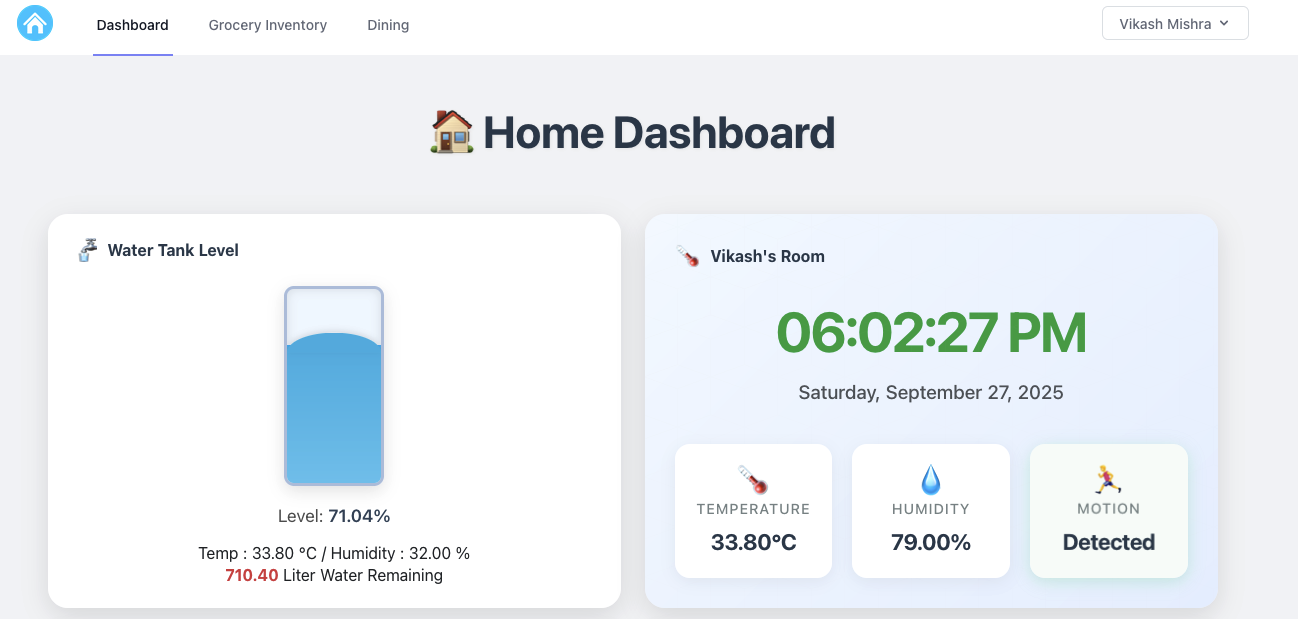
Home Dashboard

Starting your first Internet of Things (IoT) project can feel like opening a black box of circuits, code, and 3D printing fails. But the payoff—when that little red LED finally blinks, or in my case, when the water level reading finally appears on the screen—is worth every moment of frustration.

My goal was simple: stop climbing onto the roof to check the tank and instead build a reliable water level monitoring system using an ESP32.


The Hardest Part Wasn’t the Code—It Was the Plastic

When I began, I thought the coding and wiring would be my biggest challenge.
Turns out, it was the housing.

The device needed to sit securely on the tank cap and survive outdoors. That meant designing a custom, weatherproof enclosure. This is where I dove into 3D modeling with Blender—and failed many times.

I printed version after version:

  • Too small
  • Walls too thin
  • Ultrasonic sensor hole misaligned
  • Mounting screw holes stripped

Each mistake was frustrating, but every failure taught me something new. Eventually, I managed to design and print the perfect enclosure—watertight, sturdy, and snugly mounted on the tank cap.

The feeling when a digital design becomes a working physical object is simply incredible!


The IoT Brains and Sensory Organs

Here’s the simple but powerful hardware setup I used:

  • ESP32 Development Board – The brain of the project. Powerful, has built-in Wi-Fi (great for data logging or sending alerts), and beginner-friendly with the Arduino IDE.
  • Ultrasonic Distance Sensor (HC-SR04 or similar) – The core sensor. It measures the distance between the sensor and the water surface.
  • DHT11/DHT22 Sensor – Bonus sensor for temperature and humidity inside the enclosure. Not required for water monitoring, but great for learning to integrate multiple sensors.

From Distance to Liters: The Simple Physics

The trick is converting the distance measured by the sensor into meaningful values like water level percentage and remaining tank capacity.

Known values in my setup:

  • Distance from sensor to bottom (Dfloor) = 120 cm
  • Distance when tank is empty (Dempty) = 20 cm
  • Tank capacity (Vcapacity) = 1000 liters

Step 1: Usable Water Height
Hmax = Dfloor – Dempty = 100 cm

Step 2: Current Water Height
Hwater = Dfloor – Dmeasured

Step 3: Water Level Percentage
Level% = (Hwater / Hmax) × 100

Since Hmax = 100 cm, every 1 cm of water = 1% full.

Step 4: Volume Remaining
Volume = (Hwater / 100) × Vcapacity

With a 1000-liter tank and 100 cm usable height, every 1 cm of water ≈ 10 liters.


Connect with Me – Buy This Smart IoT Project!

I’m passionate about making practical IoT solutions accessible and affordable.

If this project excites you, you don’t need to build it from scratch—I’ve already developed and tested a ready-to-install Smart Water Tank Level Monitor. It’s compact, weatherproof, Wi-Fi enabled, and fully calibrated for home use.

💧 This device will save you time, effort, and water by giving you accurate tank readings instantly.

👉 If you’d like to purchase one, simply connect with me:
📩 mail@vikashmishra.online

The ESP32 Code, Web Integration, and Hosting

The ESP32 code powering this project not only calculates the water level but also integrates Wi-Fi connectivity. To ensure efficiency, it uses a smart reporting algorithm—sending data to the server only when the water level changes by 1% or more. This saves bandwidth and reduces server load.

For hosting, I use CLOUDPOKO.com

Why CLOUDPOKO?

  • Super-fast, reliable servers
  • Affordable plans perfect for IoT API calls
  • Easy setup for PHP-based dashboards
  • Outstanding uptime and support

CLOUDPOKO has been the backbone of my IoT setup. If you’re planning to host your own IoT projects or even personal websites, I highly recommend them.

On the backend, I built a simple PHP dashboard to collect sensor data and display real-time water levels. It’s lightweight, efficient, and works seamlessly with CLOUDPOKO hosting.

(I’ll share the complete ESP32 (Arduino) code in my next blog.)
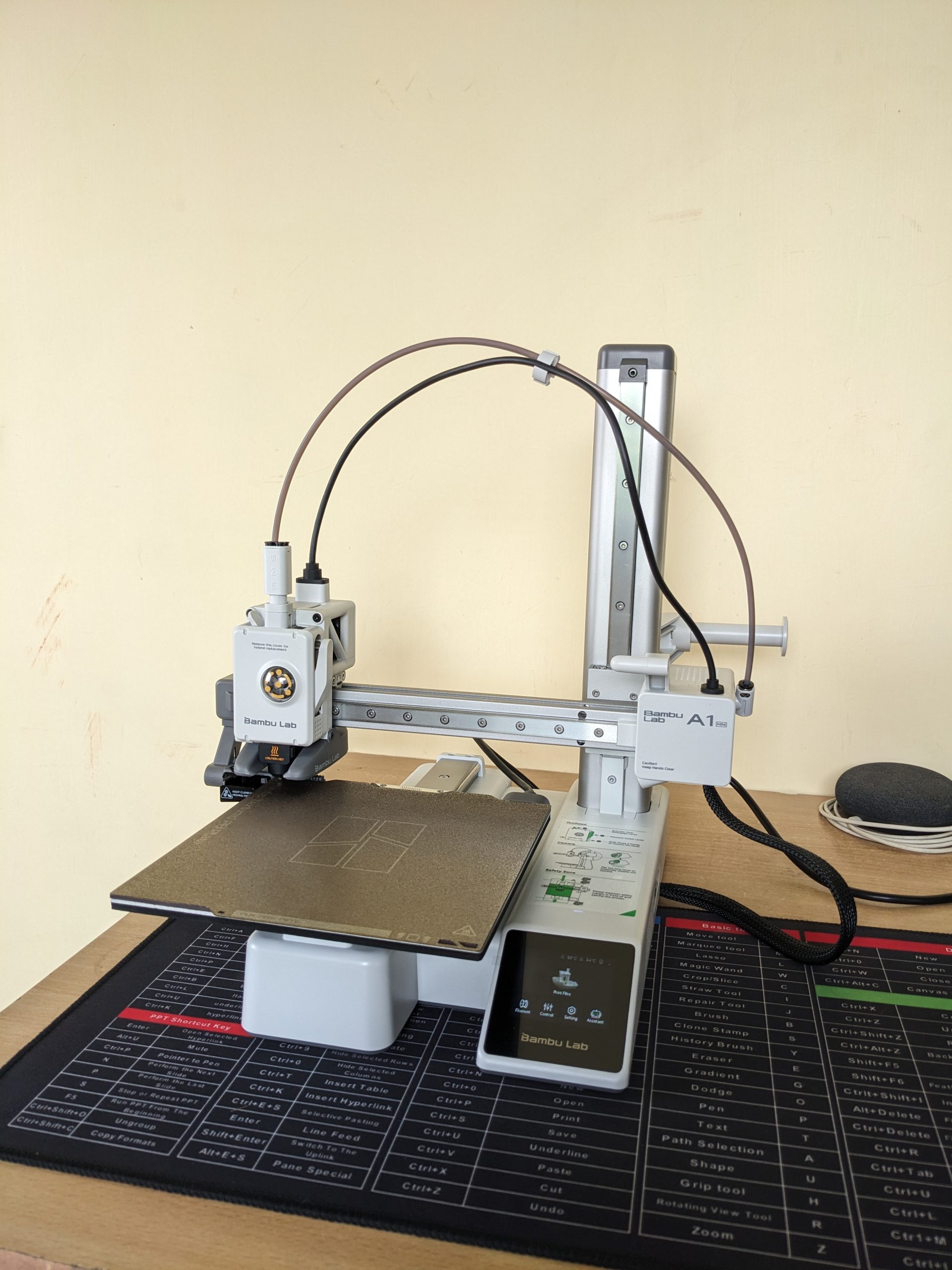
My First 3D Printer: Why I Chose the Bambu Lab A1 Mini (and How I Got It from Robu.in)

Bambu Lab A1 Mini Printer

Thinking about getting into 3D printing? If you’re anything like me, you’ve probably spent hours watching videos, reading reviews, and trying to figure out which printer is the best for a beginner. After a lot of research, I decided to pull the trigger on the Bambu Lab A1 Mini, and I’m so glad I did. I want to share my entire experience, from the moment I clicked “buy” on Robu.in to the moment the printer arrived at my doorstep.

Why the Bambu Lab A1 Mini is a Top Recommendation for Beginners

When I started my search, I knew I wanted a printer that was easy to use, reliable, and didn’t require constant tinkering. The Bambu Lab A1 Mini checked all those boxes and more. Here’s a quick rundown of what makes this printer stand out from the competition:

  • Effortless Setup and Calibration: This was a huge selling point for me. The A1 Mini has a fully automatic calibration system. It handles the bed leveling, Z-offset, vibration resonance, and pressure advance on its own. It’s a true “plug-and-play” experience, which is a massive relief for a first-timer.
  • Insane Speed: You’ll be amazed at how fast this printer is. With a maximum toolhead speed of 500textmm/s and an acceleration of 10,000textmm/s2, you can get your prints done in a fraction of the time compared to other entry-level printers. Less waiting means more creating!
  • Quiet Operation: One of the most common complaints about 3D printers is the noise. The A1 Mini’s active motor noise canceling feature makes it surprisingly quiet. This is great if you plan to have it in a shared living space or a home office.
  • Smart and Reliable: The printer is packed with sensors that prevent common printing failures. The filament run-out and tangle sensors, along with the power loss recovery feature, mean your prints are protected from unexpected issues.

In my opinion, the Bambu Lab A1 Mini is the perfect machine for anyone who wants to jump into 3D printing without the steep learning curve. It’s a solid investment that delivers on its promises.


My Experience Buying from Robu.in

As a maker in India, finding a reliable supplier for high-tech gadgets can be a challenge. I stumbled upon Robu.in and was immediately impressed by their extensive catalogue of electronics, robotics, and 3D printing supplies.

The website was easy to navigate, and finding the Bambu Lab A1 Mini was a breeze. The checkout process was straightforward, and they provided multiple secure payment options, which gave me confidence in my purchase.

Because my location is on the outskirts of the city, I expected the delivery to take a bit longer. However, the wait was completely worth it. The best part? The courier service. My package was handled by BlueDart, and I was really impressed with their service. Despite some online reviews mentioning mixed experiences, my personal delivery with them was great. The package was in perfect condition, and the delivery person was very professional and ensured it was handed over to me safely. This kind of reliable courier service is crucial when you’re buying a delicate and expensive piece of equipment.


What’s Next? Stay Tuned!

The printer is here, and I’m itching to get it unboxed and set up! I’m planning to document my entire experience, from the unboxing to my very first prints, on my new YouTube channel.

I’ll be sharing an in-depth unboxing video soon, where you’ll get a close-up look at the Bambu Lab A1 Mini and all its components. If you’re considering this printer, or just want to follow along on my 3D printing journey, be sure to subscribe to my new YouTube channel and hit the notification bell.

My experience with Robu.in and BlueDart has been excellent, and I can confidently recommend them. Now, it’s time to fire up this printer and see what it can do!

My Next DIY Obsession: From Smart Home to 3D Printing

IoT 3D Printing Banner

If you’ve followed my previous blog post, you’ll know I’ve been deep into building my own DIY smart home ecosystem. My goal is to create a fully customized, open-source-powered “brain of the house,” from automatic door locks to intelligent climate control. It’s been a rewarding challenge, but as my little IoT devices have multiplied, I’ve realized something: they’re not exactly winning any awards for style.

Right now, my creations are a mess of wires and circuit boards, functional but far from a finished product. I knew I needed to take the next step, to bridge the gap between tech-nerd-in-a-garage and home-automation-pro. That’s why I’m diving headfirst into the world of 3D printing. This isn’t just a new hobby; it’s the key to turning my chaotic prototypes into sleek, professional-looking devices.


The Plan: A Beginner’s Guide to My 3D Printing Journey

My journey is starting right at the beginning, and I’m sharing every step to help others who might be considering the same path.

Step 1: The Great Printer Hunt

This is probably the most crucial and overwhelming part. The sheer number of 3D printers on the market is mind-boggling! My top priority is finding an affordable, user-friendly FFF (Fused Filament Fabrication) printer that won’t require a degree in engineering to operate. I’m currently torn between popular beginner models like the Creality Ender 3 and the Bambu Lab A1, both known for their active communities and reliability.

Step 2: From Idea to Model

A 3D printer is just a fancy paperweight without a digital design. I’m already starting to explore 3D modeling software. For now, I’ll be using free, intuitive tools like Tinkercad to create simple enclosures for my IoT sensors. As I get more comfortable, I plan to tackle more advanced software like Fusion 360 to bring more complex designs to life. The feeling of designing something from scratch and watching it take shape layer by layer… that’s the dream.

Step 3: Picking the Perfect Plastic

Who knew there were so many types of plastic? I’m learning about different filaments and their uses. For a beginner, PLA (Polylactic Acid) seems to be the clear winner. It’s easy to work with, less prone to warping, and biodegradable—a great choice for my initial projects. Once I master PLA, I’ll move on to more durable materials like ABS for stronger, more robust enclosures.

Step 4: Time to Hit “Buy”

This is where the adventure truly begins! After weeks of research, I’ll finally be ready to purchase my first 3D printer and a few spools of filament. I’m also looking into essential accessories like a proper build plate and a good set of tools to ensure a smooth printing process.

Step 5: The First Print

My hands are already itching to hit the “print” button. I’ll probably start with something simple, maybe a small benchy or a basic enclosure for one of my temperature sensors. I know there will be failed prints and frustrating moments, but that’s all part of the fun of learning a new skill.


Beyond the Hobby: A Vision for the Future

This isn’t just a personal project. My goal is to use 3D printing to create professional, ready-to-use housings for my IoT devices. In the near future, I plan to make my custom 3D models and even the completed IoT devices available for purchase.

Just a heads-up: this blog post isn’t sponsored, but if any brands are looking for genuine, hands-on product reviews, I’d love to collaborate!

I’ll be documenting every step, from my first successful print to my inevitable failures. If you’re excited to follow along and learn with me, be sure to subscribe to my blog so you don’t miss any updates on my smart home and 3D printing journey. You can also catch up on my original plan for the DIY Smart Home Revolution here.

What kind of project would you love to create with a 3D printer? Let me know in the comments below!

Run Powerful AI on Your PC: My Hands-On Experience with Ollama and Small Language Models (10-Minute Read)

AI - Ollama Hands on

Hey everyone! Ever felt curious about playing around with Artificial Intelligence, but thought it needed a supercomputer that costs a fortune? Well, I’m here to share my personal journey of diving into the world of AI right on my regular PC, thanks to a fantastic tool called Ollama and the magic of small language models (SLMs). For us in India, access to powerful and private AI is becoming increasingly important, and this method offers just that. Trust me, if I can do it, anyone can! Let’s get started on this exciting adventure. 🚀


My “Aha!” Moment with Local AI

Like many of you, I’ve been fascinated by the buzz around AI. Tools like ChatGPT are incredible, but the thought of running something similar, completely privately, on my own machine always seemed like a distant dream. Concerns about data privacy and the need for constant internet access were always at the back of my mind.

Then, I stumbled upon Ollama. It was like a lightbulb went off! This open-source tool promised a simple way to download, run, and manage large language models (LLMs) locally. My initial thought was, “Yeah, right. My PC can barely handle some games.” But as I dug deeper, I discovered the world of small language models. These are AI models that are intentionally designed to be efficient and lightweight, making them perfect for running on everyday computers without needing top-tier GPUs or massive amounts of RAM.

My “aha!” moment came when I successfully ran my first model. The feeling of having a conversational AI running purely on my laptop, without any internet connection, was truly empowering. It opened up a whole new world of experimentation and learning, all within the secure confines of my own device.


Step-by-Step: How I Got My First AI Model Running Locally

Let me walk you through the exact steps I took to get my first small language model up and running using Ollama. It’s simpler than you might think!

1. Installing Ollama: The Easy First Step

The first step was to get Ollama installed on my PC. I headed over to the official Ollama website (it’s super easy to find with a quick Google search). They have clear installation instructions and download links for Windows, macOS, and Linux. Since I’m on Windows, I downloaded the .exe file. The installation process was a breeze – just a few clicks, and Ollama was ready to go. It even runs a little server in the background without you having to do anything complicated.

2. Opening the Command Line: Your Gateway to AI

Ollama works through your computer’s terminal or command prompt. Think of it as a direct line to your system.

  • For Windows users: Just type “cmd” or “Command Prompt” in your Start Menu search bar and click on it.
  • For macOS/Linux users: Open the “Terminal” application (you can usually find it in your Utilities folder).

Don’t be intimidated by the command line! We’ll only be using a few simple commands.

3. Choosing the Right Small Model: Efficiency is Key

This is where the magic of running AI on a regular PC truly shines. Instead of aiming for massive, resource-hungry models, we focus on small language models (SLMs). These models are trained on vast amounts of data but are optimized for speed and efficiency.

I browsed the Ollama library. It’s like an app store for AI models! I was looking for models with parameter counts in the billions (indicated by ‘B’), rather than tens or hundreds of billions. Based on recommendations and their descriptions, I decided to start with Phi-3 Mini (3.8B). It’s known for its impressive performance despite its small size. Other great options include Gemma (2B or 7B) by Google and Llama 3 (8B) by Meta.

4. Running Your First AI Model: The Exciting Part!

Now for the moment of truth! In my command prompt, I typed the following command:

<pre><code class=”language-bash”>ollama run phi3 </code></pre>

(Of course, if you choose a different model, you’d replace phi3 with the model’s name, like ollama run gemma:2b or ollama run llama3:8b).

The first time you run this command for a particular model, Ollama will automatically download it from the internet. This might take a few minutes, depending on your internet speed. Grab a cup of chai while you wait! ☕

Once the download is complete, you’ll see a >>> Send a message prompt. This is it! You’re now interacting with an AI model running locally on your PC. I typed a simple greeting, and the model responded almost instantly. I was amazed! I then asked it to summarize a short article I had, and it did a pretty good job.

To end the conversation, just type /bye and press Enter.


My Go-To Small Language Model Recommendations for Indian Users

Based on my experience, here are some small language models that I found particularly good for getting started, keeping in mind the kind of tasks we might commonly need:

  • Phi-3 Mini (3.8B): Excellent all-rounder. Great for creative writing, summarizing text, answering questions, and even some basic coding tasks. Its smaller size makes it very responsive.
  • Gemma (2B): If you have a slightly older PC or want something incredibly lightweight, Gemma 2B is a fantastic choice. It’s surprisingly capable for its size and can handle basic natural language tasks efficiently.
  • Llama 3 (8B): While slightly larger than Phi-3 Mini, Llama 3 8B offers a noticeable step up in performance for more complex tasks. It’s a good balance between capability and resource usage.

Remember to check the Ollama library for the exact command to run each specific version of these models (e.g., ollama run gemma:7b).


Level Up Your Local AI Experience: Essential Resources

To help you on your journey with Ollama and local AI, here are some fantastic resources I found incredibly helpful:

  • Official Ollama Documentation: This is your primary source for all things Ollama. You’ll find detailed instructions, command references, and guides on more advanced features: https://ollama.com/docs
  • Ollama Model Library: Keep exploring this page to discover new and interesting small language models: https://ollama.com/library

And here are some engaging video tutorials that can guide you visually:


Why This Matters for Us in India

Running AI models locally has significant benefits, especially for users in India:

  • Data Privacy: Your interactions and data stay on your computer, crucial for sensitive information.
  • Offline Access: No need for a constant internet connection, which can be unreliable in some areas.
  • Cost Savings: Once the models are downloaded, there are no recurring costs associated with usage.
  • Learning and Experimentation: It provides a fantastic platform for students, developers, and anyone curious about AI to learn and experiment without relying on external services.

My experience with Ollama and small language models has been incredibly positive. It’s empowering to have access to AI capabilities right on my PC, privately and affordably. I encourage all of you to give it a try. It’s a fantastic way to explore the exciting world of artificial intelligence without needing a high-end machine. Share your experiences in the comments below – I’d love to hear about the models you try and the cool things you do with them! Happy AI exploring! 😊

Better Late Than Never: My DIY Smart Home Revolution is Underway!

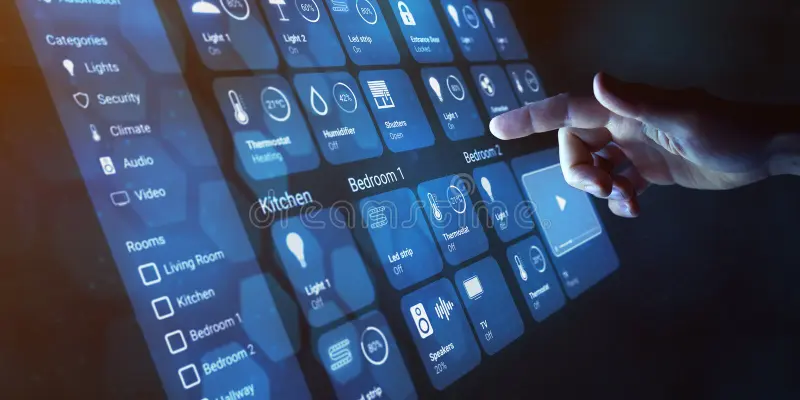
home automation

NOTE: All the materials/software/solutions I’ll be using in this project will be open-source and designed by me; no ready-to-use solutions will be used. It will be a complete personal project.

Introduction:

Ever felt like you missed the boat on the smart home trend? For years, I watched from the sidelines as friends and tech enthusiasts automated their lives. I’ll admit it – a part of me thought, “It’s a bit late for me.” But that feeling has given way to a new obsession: building my own complete, custom home automation system from the ground up.

This isn’t about buying a few smart plugs and calling it a day. This is about a full-scale home revolution, a project fueled by a desire for convenience, security, and a little bit of tech wizardry. If you’ve ever dreamt of a home that truly works for you, stick around. This is my journey, and it’s just getting started.

The Master Plan: A Home That Thinks for Itself

My goal is a holistic ecosystem that integrates every aspect of my daily life. Forget about fragmented apps and devices. My system is designed to be the brain of the house, handling everything from security to sustainability.

Here’s a breakdown of the core features I’m building:

  • Your Personal Digital Butler: My system will be the ultimate notification hub. Get instant alerts for everything: a package delivery, a water leak, or even a simple reminder to take out the trash. No more missed events, no more forgotten tasks.
  • The Unlocking Experience: I’m ditching the traditional key. With automatic door mechanisms and a fingerprint sensor, entry into my home will be seamless and highly secure. The door will know when I’m home and lock itself behind me, offering peace of mind.
  • Climate Control, Perfected: No more fiddling with the remote. Using temperature and humidity sensors, my system will intelligently manage the existing AC units to maintain a perfect, comfortable climate, all while optimizing energy usage.
  • Water Management, Simplified: Water is a precious resource. My system will monitor the water tank level in real-time, preventing overflows and automating the refilling process for efficient, hassle-free water management.
  • Smarter Appliances, Smarter Living: I’m putting an end to manual tasks. Using relay modules, I’ll control lights, fans, the washing machine, and other appliances remotely. Imagine a routine where the coffee maker starts brewing just as your alarm goes off.
  • The Guardian of the Network: A stable, secure network is the backbone of a smart home. My system will actively monitor the network, alerting me to any connectivity issues or suspicious activity, keeping my digital life safe.
  • Energy at a Glance: I’m a firm believer in “you can’t manage what you don’t measure.” I’ll be monitoring electricity availability and consumption to gain valuable insights, helping me identify opportunities to reduce my power bill and environmental footprint.
  • My Indoor Garden’s Best Friend: For the plant parent in me, I’m building a smart plant watering system that will use moisture sensors to deliver the perfect amount of water, ensuring my green friends thrive without constant supervision.
  • Automated Sentimental Reminders: Life gets busy. My system will be a digital memory keeper, automatically sending out personalized greetings for birthdays and anniversaries, making sure I never miss a special moment.

The Tech Behind the Magic

The heart of this entire operation is a powerful Raspberry Pi 5 server. For security, this server will be completely isolated from the direct internet, running all automation tasks over my local network (Wi-Fi and LAN). Remote access will be exclusively through a secure VPN connection, ensuring all my data stays private and protected.

The components I’m using are a tinkerer’s dream: ESP32 microcontrollers, distance sensors, light sensors, and a host of other peripherals.

But what’s a smart home without a command center? All the data and controls for this entire ecosystem will be displayed on a dedicated, always-on 10-inch screen. This central hub will provide a real-time overview of every system and allow me to control everything with a simple touch.

Join the Smart Home Revolution

This project is more than just a hobby; it’s a testament to the power of DIY and the incredible potential of technology to simplify our lives. I’ll be sharing every step of this journey, from the wiring nightmares to the triumphant moments of a fully automated routine.

If you’re inspired and looking to build a similar setup, I’m excited to announce that I’ll soon be offering the hardware and custom services I’m designing. To stay in the loop and get early access, drop me an email at mail@vikashmishra.online.

The era of the truly intelligent home is here, and I’m proof that it’s never too late to start building your own.

Liberating My Digital Life: How I Use n8n for Daily Work, Home, and Building Tools with ESP32

n8n esp32

Hey everyone!

If you’re anything like me, your daily digital life probably feels like a never-ending juggling act. From managing work tasks and emails to keeping my home life organized and even dabbling in personal tech projects, there’s always something demanding my attention. I used to feel constantly overwhelmed by the sheer volume of repetitive actions: moving files, sending routine notifications, updating spreadsheets, or just wishing my various apps and even my home devices could talk to each other seamlessly.

I spent a lot of time searching for a better way. I tried individual app integrations, simple “if-this-then-that” services, but they always felt limited. They either couldn’t handle the complexity I needed, or their subscription costs quickly escalated as my automation ambitions grew.

Then, I discovered n8n. It wasn’t just another automation tool; it felt like finding a missing piece of my digital puzzle. When I heard it was “open-source” and “self-hostable,” I initially thought, “Oh, great, another complex setup.” But after diving in, I realized it was the perfect blend of power, flexibility, and control. n8n has truly revolutionized how I approach my daily work, manage my home life, and even build custom tools.

So, if you’re ready to take charge of your digital world and automate away the drudgery, let me show you how I’m using n8n to make my life simpler, smarter, and more integrated.


My Journey with n8n: Beyond Just Automation

At its core, n8n (pronounced “n-eight-n”) is an open-source, low-code workflow automation platform. For me, it translates into a few key benefits that resonate deeply with how I operate:

  • Financial Freedom: The fact that it’s free to use if you host it yourself is a massive advantage. I can build extensive automations without worrying about spiraling monthly bills, which is fantastic for personal projects and small-scale professional use.
  • Visual Simplicity, Deep Power: Building workflows in n8n is incredibly intuitive. You use a visual, drag-and-drop interface where each “node” represents an app, a service, or a specific action. You connect these nodes to create logical “workflows.” It’s like sketching out a flowchart, but then it actually executes your instructions. And if I ever need to get really specific, I can drop in a bit of JavaScript or Python, offering a level of flexibility rarely seen in other tools.
  • Complete Control & Privacy: The self-hosting option was a huge draw. It means my data, my credentials, and all my automation logic reside on my own server. This gives me unparalleled control and peace of mind regarding privacy, especially when dealing with personal or sensitive information. (For those who prefer not to manage a server, n8n also offers a convenient cloud service!)

My first successful workflow, connecting a form submission to a Google Sheet and sending a notification, felt like a small victory. But it quickly escalated into much more complex and satisfying projects.


How I Use n8n: Real-World Examples from Office, Home, and Beyond

Here are some actual workflows that run daily in my setup, impacting different facets of my life:

1. Office/Work Automation: My “Smart Admin Assistant”

Even in a personal capacity or managing a small business, administrative tasks can pile up. n8n helps me manage them with ease.

  • Automated Meeting Notes Trigger: When a meeting ends on my Google Calendar, n8n automatically creates a draft document in Notion or Google Docs with the meeting title, attendees, and a prompt for me to add notes.
  • Client Inquiry Management: Any inquiries from my service pages (using a tool like Typeform or a custom web form) are routed directly via n8n.
    • Action 1: Details are automatically added to a structured Google Sheet (my simple CRM).
    • Action 2: Urgent inquiries trigger a direct notification to my Slack or Telegram app.
    • Action 3: A personalized acknowledgment email is sent via Gmail or my marketing platform.

The Benefit: Less time on manual data entry and setup, more time focusing on productive work. I never miss a lead or forget to follow up.

2. Home Automation: The “Digital House Assistant”

n8n isn’t just for work! It’s fantastic for making my home life smoother.

  • Automated Bill & Subscription Tracker: I have n8n scanning specific email addresses for new bills or subscription notifications.
    • Action 1: It extracts key details (amount, due date, service) and logs them into a dedicated Google Sheet for financial overview.
    • Action 2: If a new subscription is detected or a large bill arrives, it sends me a notification on Telegram to review.
  • Smart Weather Alerts: Before I leave for the day, n8n tells me what to expect.
    • Trigger: Scheduled daily at 7 AM.
    • Action: Fetches weather data from OpenWeatherMap for my location. If rain is predicted or the temperature is outside my comfort zone, it sends a message to my smart speaker (via an integration like Home Assistant) and my phone, advising me to carry an umbrella or a jacket.

The Benefit: Better financial oversight and no more unexpected downpours!

3. Building Tools: Interacting with the Physical World using ESP32

This is where n8n gets really exciting for me – bridging the digital and physical. I’ve been experimenting with ESP32 microcontrollers (those tiny, affordable Wi-Fi enabled boards) to create custom IoT solutions, and n8n is the perfect backend.

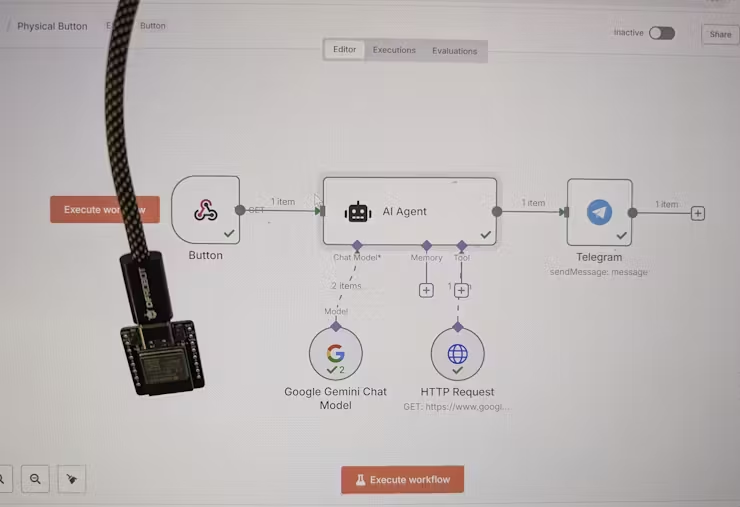
  • The “Press for Pizza” Button:
    • Hardware: An ESP32 board connected to a simple push button. When pressed, the ESP32 sends an HTTP POST request (a “webhook”) to a specific n8n URL.
    • n8n Workflow:
      • Trigger: Receives the webhook from the ESP32.
      • Action 1: Sends a message to a group chat in Telegram (or Discord/Slack) with “Pizza time! Someone order please.”
      • Action 2 (Optional): Could even trigger an order with a food delivery service API if I set that up!
  • Environment Monitor & Alert System:
    • Hardware: An ESP32 connected to temperature/humidity sensors. It periodically (e.g., every 5 minutes) reads the sensor data and sends it via MQTT (a lightweight messaging protocol for IoT) to an MQTT broker that n8n is listening to.
    • n8n Workflow:
      • Trigger: Receives a new MQTT message from the ESP32.
      • Action 1: Logs the temperature and humidity data to a Google Sheet or a local database for historical tracking.
      • Action 2: If the temperature or humidity goes above/below a set threshold, it sends a notification to my phone or even toggles a smart plug (via Home Assistant) connected to a fan or humidifier.

The Impact: I can build truly custom smart home devices or physical interaction points, collecting real-world data and automating responses, all orchestrated visually through n8n! It’s incredibly satisfying to see these custom tools come to life.


Why n8n is Such a Powerful Addition to My Toolkit

If you’re feeling the push and pull of digital tasks like I was, n8n offers a compelling solution. I wholeheartedly recommend exploring it if you:

  • Are tired of manual drudgery: It’s built for automating those repeatable tasks that drain your time and energy.
  • Value privacy and control: The self-hosting option is a huge advantage for keeping your data in your hands.
  • Want powerful automation without breaking the bank: Leverage the open-source community edition for free.
  • Are keen to integrate AI into your routines: Its robust AI nodes (for LLMs like OpenAI, Gemini, Ollama) make it surprisingly easy to add intelligence to your workflows.
  • Enjoy tinkering with hardware: The ability to seamlessly connect with microcontrollers like ESP32 opens up a world of physical automation.
  • Find other “no-code” tools too restrictive: n8n offers a fantastic balance of visual building and underlying flexibility. There’s a learning curve, but the community and documentation are incredibly supportive.

For me, embracing n8n has been about much more than just saving time; it’s about gaining mental bandwidth and focusing on creative, impactful work. The ability to connect my office software, home devices, and even custom hardware projects under one automation umbrella is truly transformative.


Ready to Build Your Own Automated World?

If this resonates with you, I encourage you to check out n8n. Whether you start with their hosted cloud service or dive into self-hosting, you’re investing in a more efficient, less stressful digital future.

What repetitive tasks are you currently struggling with? Are you also interested in bridging the digital and physical with tools like ESP32? Share your thoughts and automation aspirations in the comments below!