
Run Powerful AI on Your PC: My Hands-On Experience with Ollama and Small Language Models (10-Minute Read)

AI - Ollama Hands on

Hey everyone! Ever felt curious about playing around with Artificial Intelligence, but thought it needed a supercomputer that costs a fortune? Well, I’m here to share my personal journey of diving into the world of AI right on my regular PC, thanks to a fantastic tool called Ollama and the magic of small language models (SLMs). For us in India, access to powerful and private AI is becoming increasingly important, and this method offers just that. Trust me, if I can do it, anyone can! Let’s get started on this exciting adventure. 🚀


My “Aha!” Moment with Local AI

Like many of you, I’ve been fascinated by the buzz around AI. Tools like ChatGPT are incredible, but the thought of running something similar, completely privately, on my own machine always seemed like a distant dream. Concerns about data privacy and the need for constant internet access were always at the back of my mind.

Then, I stumbled upon Ollama. It was like a lightbulb went off! This open-source tool promised a simple way to download, run, and manage large language models (LLMs) locally. My initial thought was, “Yeah, right. My PC can barely handle some games.” But as I dug deeper, I discovered the world of small language models. These are AI models that are intentionally designed to be efficient and lightweight, making them perfect for running on everyday computers without needing top-tier GPUs or massive amounts of RAM.

My “aha!” moment came when I successfully ran my first model. The feeling of having a conversational AI running purely on my laptop, without any internet connection, was truly empowering. It opened up a whole new world of experimentation and learning, all within the secure confines of my own device.


Step-by-Step: How I Got My First AI Model Running Locally

Let me walk you through the exact steps I took to get my first small language model up and running using Ollama. It’s simpler than you might think!

1. Installing Ollama: The Easy First Step

The first step was to get Ollama installed on my PC. I headed over to the official Ollama website (it’s super easy to find with a quick Google search). They have clear installation instructions and download links for Windows, macOS, and Linux. Since I’m on Windows, I downloaded the .exe file. The installation process was a breeze – just a few clicks, and Ollama was ready to go. It even runs a little server in the background without you having to do anything complicated.

2. Opening the Command Line: Your Gateway to AI

Ollama works through your computer’s terminal or command prompt. Think of it as a direct line to your system.

  • For Windows users: Just type “cmd” or “Command Prompt” in your Start Menu search bar and click on it.
  • For macOS/Linux users: Open the “Terminal” application (you can usually find it in your Utilities folder).

Don’t be intimidated by the command line! We’ll only be using a few simple commands.

3. Choosing the Right Small Model: Efficiency is Key

This is where the magic of running AI on a regular PC truly shines. Instead of aiming for massive, resource-hungry models, we focus on small language models (SLMs). These models are trained on vast amounts of data but are optimized for speed and efficiency.

I browsed the Ollama library. It’s like an app store for AI models! I was looking for models with parameter counts in the billions (indicated by ‘B’), rather than tens or hundreds of billions. Based on recommendations and their descriptions, I decided to start with Phi-3 Mini (3.8B). It’s known for its impressive performance despite its small size. Other great options include Gemma (2B or 7B) by Google and Llama 3 (8B) by Meta.

4. Running Your First AI Model: The Exciting Part!

Now for the moment of truth! In my command prompt, I typed the following command:

<pre><code class=”language-bash”>ollama run phi3 </code></pre>

(Of course, if you choose a different model, you’d replace phi3 with the model’s name, like ollama run gemma:2b or ollama run llama3:8b).

The first time you run this command for a particular model, Ollama will automatically download it from the internet. This might take a few minutes, depending on your internet speed. Grab a cup of chai while you wait! ☕

Once the download is complete, you’ll see a >>> Send a message prompt. This is it! You’re now interacting with an AI model running locally on your PC. I typed a simple greeting, and the model responded almost instantly. I was amazed! I then asked it to summarize a short article I had, and it did a pretty good job.

To end the conversation, just type /bye and press Enter.


My Go-To Small Language Model Recommendations for Indian Users

Based on my experience, here are some small language models that I found particularly good for getting started, keeping in mind the kind of tasks we might commonly need:

  • Phi-3 Mini (3.8B): Excellent all-rounder. Great for creative writing, summarizing text, answering questions, and even some basic coding tasks. Its smaller size makes it very responsive.
  • Gemma (2B): If you have a slightly older PC or want something incredibly lightweight, Gemma 2B is a fantastic choice. It’s surprisingly capable for its size and can handle basic natural language tasks efficiently.
  • Llama 3 (8B): While slightly larger than Phi-3 Mini, Llama 3 8B offers a noticeable step up in performance for more complex tasks. It’s a good balance between capability and resource usage.

Remember to check the Ollama library for the exact command to run each specific version of these models (e.g., ollama run gemma:7b).


Level Up Your Local AI Experience: Essential Resources

To help you on your journey with Ollama and local AI, here are some fantastic resources I found incredibly helpful:

  • Official Ollama Documentation: This is your primary source for all things Ollama. You’ll find detailed instructions, command references, and guides on more advanced features: https://ollama.com/docs
  • Ollama Model Library: Keep exploring this page to discover new and interesting small language models: https://ollama.com/library

And here are some engaging video tutorials that can guide you visually:


Why This Matters for Us in India

Running AI models locally has significant benefits, especially for users in India:

  • Data Privacy: Your interactions and data stay on your computer, crucial for sensitive information.
  • Offline Access: No need for a constant internet connection, which can be unreliable in some areas.
  • Cost Savings: Once the models are downloaded, there are no recurring costs associated with usage.
  • Learning and Experimentation: It provides a fantastic platform for students, developers, and anyone curious about AI to learn and experiment without relying on external services.

My experience with Ollama and small language models has been incredibly positive. It’s empowering to have access to AI capabilities right on my PC, privately and affordably. I encourage all of you to give it a try. It’s a fantastic way to explore the exciting world of artificial intelligence without needing a high-end machine. Share your experiences in the comments below – I’d love to hear about the models you try and the cool things you do with them! Happy AI exploring! 😊

Beyond the Hype: The Hard Truth About Generative AI’s 95% Failure Rate

AI Faulure

Is the hype around generative AI starting to deflate? A groundbreaking new study from MIT is sending shockwaves through the tech world, revealing that a staggering 95% of generative AI projects are failing to deliver real business value. This eye-opening statistic is fueling concerns of a potential tech bubble, leaving many to wonder if the AI revolution is more fizz than bang.

We’ve all seen the headlines promising transformative power, from AI chatbots revolutionizing customer service to AI tools supercharging content creation. But the reality, according to MIT’s “The GenAI Divide: State of AI in Business 2025” report, is far less glamorous. While individuals are finding handy uses for these tools, enterprises are largely struggling to translate pilot projects into tangible results.

Why the Generative AI Gold Rush is Turning into a Bust:

So, what’s behind this massive failure rate? It boils down to several critical factors:

  • The “AI Adaptation Gap”: Simply deploying a powerful AI model isn’t enough. Companies are realizing that generic AI needs significant customization and integration into their unique workflows. Without this crucial step, the AI remains a shiny toy that doesn’t actually solve business problems. Think of it like buying a Formula 1 car and expecting it to navigate Mumbai’s traffic without any modifications!
  • Chasing Hype, Not Value: Many organizations jumped on the generative AI bandwagon due to FOMO (fear of missing out), launching projects without clearly defined objectives or a solid understanding of how AI would drive real business value. The result? Technically impressive projects that don’t impact the bottom line.
  • Dirty Data, Broken Infrastructure: AI thrives on high-quality data. Unfortunately, many companies are grappling with data silos, inconsistencies, and a lack of “AI-ready” data. As the saying goes, “garbage in, garbage out.” Poor data leads to unreliable AI outputs and stalled projects.
  • The Overpromise Problem: The capabilities of generative AI have been heavily hyped, leading to unrealistic expectations. As this insightful video from Matt Berman on YouTube (Video linked below) points out, AI still struggles with many complex tasks, and the initial promises often fall short in real-world application.


The Human Cost of AI Overreach: When Automation Backfires

One of the biggest pitfalls is the rush to replace human workers with AI without a clear understanding of the nuances involved. While AI can automate repetitive tasks, many roles require uniquely human skills like emotional intelligence, complex problem-solving, and creative thinking.

Consider companies that prematurely downsized their customer service teams in favor of AI chatbots, only to face customer frustration and the need to rehire human agents. This highlights the danger of underestimating the value of human connection and adaptability in the workplace. Relying solely on AI in such scenarios can lead to:

  • Diminished Customer Experience: AI, for now, lacks the empathy and nuanced understanding to handle complex or emotionally charged customer interactions effectively.
  • Loss of Innovation: True creativity and out-of-the-box thinking often come from human intuition and collaboration, which AI cannot replicate.
  • Employee Disengagement: When employees feel like they are being replaced by machines, morale and productivity can plummet.

Where AI Still Doesn’t Belong (Yet!) 🚫

While AI’s capabilities are rapidly evolving, certain fields remain firmly in the realm of human expertise. As of now, AI is not well-suited for roles that demand:

  • High-Stakes Judgment and Creativity: Fields like artistic creation, strategic decision-making with incomplete information, and critical ethical judgments require a level of human intuition and understanding that AI currently lacks.
  • Deep Empathy and Interpersonal Connection: Professions such as therapy, counseling, nursing (especially bedside care), and teaching rely heavily on human-to-human connection and emotional intelligence.
  • Complex Physical Dexterity and Adaptability in Unstructured Environments: Think of skilled trades like plumbing, electrical work, and construction. These jobs require navigating unpredictable situations and fine motor skills that current robotic AI struggles with.

Navigating the Generative AI Landscape: A More Realistic Approach

The MIT study serves as a crucial wake-up call. Instead of blindly chasing the latest AI trends, businesses need to adopt a more strategic and realistic approach. This involves:

  • Focusing on Clear Business Problems: Identify specific challenges where AI can provide tangible solutions and measurable ROI.
  • Investing in Data Quality and Infrastructure: Ensure your data is clean, accessible, and properly formatted for AI training.
  • Prioritizing Integration and Customization: Adapt generic AI models to your specific needs and seamlessly integrate them into existing workflows.
  • Augmenting Human Capabilities, Not Replacing Them: Focus on how AI can empower employees and enhance their productivity, rather than simply trying to automate jobs out of existence.

The generative AI revolution is far from over, but the current hype cycle needs a healthy dose of realism. By understanding the limitations and focusing on strategic implementation, businesses can harness the true potential of AI without falling victim to the bursting bubble.

Feel free to subscribe and share the article. It feels good to see new subscribers and readers on the blog.

Liberating My Digital Life: How I Use n8n for Daily Work, Home, and Building Tools with ESP32

n8n esp32

Hey everyone!

If you’re anything like me, your daily digital life probably feels like a never-ending juggling act. From managing work tasks and emails to keeping my home life organized and even dabbling in personal tech projects, there’s always something demanding my attention. I used to feel constantly overwhelmed by the sheer volume of repetitive actions: moving files, sending routine notifications, updating spreadsheets, or just wishing my various apps and even my home devices could talk to each other seamlessly.

I spent a lot of time searching for a better way. I tried individual app integrations, simple “if-this-then-that” services, but they always felt limited. They either couldn’t handle the complexity I needed, or their subscription costs quickly escalated as my automation ambitions grew.

Then, I discovered n8n. It wasn’t just another automation tool; it felt like finding a missing piece of my digital puzzle. When I heard it was “open-source” and “self-hostable,” I initially thought, “Oh, great, another complex setup.” But after diving in, I realized it was the perfect blend of power, flexibility, and control. n8n has truly revolutionized how I approach my daily work, manage my home life, and even build custom tools.

So, if you’re ready to take charge of your digital world and automate away the drudgery, let me show you how I’m using n8n to make my life simpler, smarter, and more integrated.


My Journey with n8n: Beyond Just Automation

At its core, n8n (pronounced “n-eight-n”) is an open-source, low-code workflow automation platform. For me, it translates into a few key benefits that resonate deeply with how I operate:

  • Financial Freedom: The fact that it’s free to use if you host it yourself is a massive advantage. I can build extensive automations without worrying about spiraling monthly bills, which is fantastic for personal projects and small-scale professional use.
  • Visual Simplicity, Deep Power: Building workflows in n8n is incredibly intuitive. You use a visual, drag-and-drop interface where each “node” represents an app, a service, or a specific action. You connect these nodes to create logical “workflows.” It’s like sketching out a flowchart, but then it actually executes your instructions. And if I ever need to get really specific, I can drop in a bit of JavaScript or Python, offering a level of flexibility rarely seen in other tools.
  • Complete Control & Privacy: The self-hosting option was a huge draw. It means my data, my credentials, and all my automation logic reside on my own server. This gives me unparalleled control and peace of mind regarding privacy, especially when dealing with personal or sensitive information. (For those who prefer not to manage a server, n8n also offers a convenient cloud service!)

My first successful workflow, connecting a form submission to a Google Sheet and sending a notification, felt like a small victory. But it quickly escalated into much more complex and satisfying projects.


How I Use n8n: Real-World Examples from Office, Home, and Beyond

Here are some actual workflows that run daily in my setup, impacting different facets of my life:

1. Office/Work Automation: My “Smart Admin Assistant”

Even in a personal capacity or managing a small business, administrative tasks can pile up. n8n helps me manage them with ease.

  • Automated Meeting Notes Trigger: When a meeting ends on my Google Calendar, n8n automatically creates a draft document in Notion or Google Docs with the meeting title, attendees, and a prompt for me to add notes.
  • Client Inquiry Management: Any inquiries from my service pages (using a tool like Typeform or a custom web form) are routed directly via n8n.
    • Action 1: Details are automatically added to a structured Google Sheet (my simple CRM).
    • Action 2: Urgent inquiries trigger a direct notification to my Slack or Telegram app.
    • Action 3: A personalized acknowledgment email is sent via Gmail or my marketing platform.

The Benefit: Less time on manual data entry and setup, more time focusing on productive work. I never miss a lead or forget to follow up.

2. Home Automation: The “Digital House Assistant”

n8n isn’t just for work! It’s fantastic for making my home life smoother.

  • Automated Bill & Subscription Tracker: I have n8n scanning specific email addresses for new bills or subscription notifications.
    • Action 1: It extracts key details (amount, due date, service) and logs them into a dedicated Google Sheet for financial overview.
    • Action 2: If a new subscription is detected or a large bill arrives, it sends me a notification on Telegram to review.
  • Smart Weather Alerts: Before I leave for the day, n8n tells me what to expect.
    • Trigger: Scheduled daily at 7 AM.
    • Action: Fetches weather data from OpenWeatherMap for my location. If rain is predicted or the temperature is outside my comfort zone, it sends a message to my smart speaker (via an integration like Home Assistant) and my phone, advising me to carry an umbrella or a jacket.

The Benefit: Better financial oversight and no more unexpected downpours!

3. Building Tools: Interacting with the Physical World using ESP32

This is where n8n gets really exciting for me – bridging the digital and physical. I’ve been experimenting with ESP32 microcontrollers (those tiny, affordable Wi-Fi enabled boards) to create custom IoT solutions, and n8n is the perfect backend.

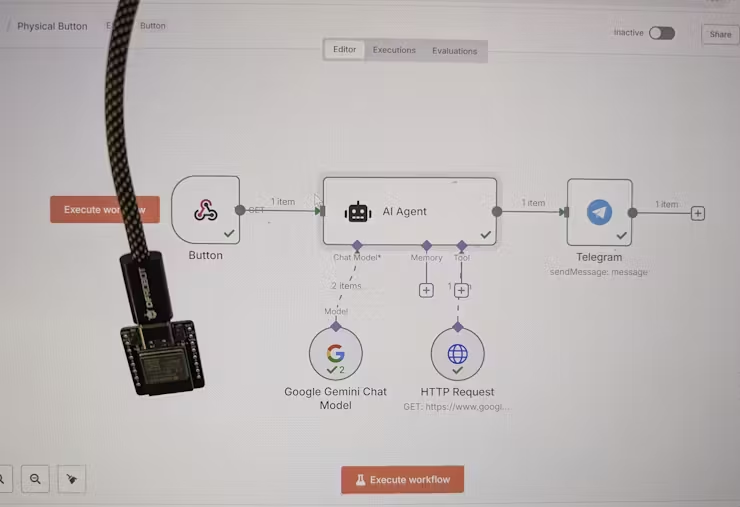
  • The “Press for Pizza” Button:
    • Hardware: An ESP32 board connected to a simple push button. When pressed, the ESP32 sends an HTTP POST request (a “webhook”) to a specific n8n URL.
    • n8n Workflow:
      • Trigger: Receives the webhook from the ESP32.
      • Action 1: Sends a message to a group chat in Telegram (or Discord/Slack) with “Pizza time! Someone order please.”
      • Action 2 (Optional): Could even trigger an order with a food delivery service API if I set that up!
  • Environment Monitor & Alert System:
    • Hardware: An ESP32 connected to temperature/humidity sensors. It periodically (e.g., every 5 minutes) reads the sensor data and sends it via MQTT (a lightweight messaging protocol for IoT) to an MQTT broker that n8n is listening to.
    • n8n Workflow:
      • Trigger: Receives a new MQTT message from the ESP32.
      • Action 1: Logs the temperature and humidity data to a Google Sheet or a local database for historical tracking.
      • Action 2: If the temperature or humidity goes above/below a set threshold, it sends a notification to my phone or even toggles a smart plug (via Home Assistant) connected to a fan or humidifier.

The Impact: I can build truly custom smart home devices or physical interaction points, collecting real-world data and automating responses, all orchestrated visually through n8n! It’s incredibly satisfying to see these custom tools come to life.


Why n8n is Such a Powerful Addition to My Toolkit

If you’re feeling the push and pull of digital tasks like I was, n8n offers a compelling solution. I wholeheartedly recommend exploring it if you:

  • Are tired of manual drudgery: It’s built for automating those repeatable tasks that drain your time and energy.
  • Value privacy and control: The self-hosting option is a huge advantage for keeping your data in your hands.
  • Want powerful automation without breaking the bank: Leverage the open-source community edition for free.
  • Are keen to integrate AI into your routines: Its robust AI nodes (for LLMs like OpenAI, Gemini, Ollama) make it surprisingly easy to add intelligence to your workflows.
  • Enjoy tinkering with hardware: The ability to seamlessly connect with microcontrollers like ESP32 opens up a world of physical automation.
  • Find other “no-code” tools too restrictive: n8n offers a fantastic balance of visual building and underlying flexibility. There’s a learning curve, but the community and documentation are incredibly supportive.

For me, embracing n8n has been about much more than just saving time; it’s about gaining mental bandwidth and focusing on creative, impactful work. The ability to connect my office software, home devices, and even custom hardware projects under one automation umbrella is truly transformative.


Ready to Build Your Own Automated World?

If this resonates with you, I encourage you to check out n8n. Whether you start with their hosted cloud service or dive into self-hosting, you’re investing in a more efficient, less stressful digital future.

What repetitive tasks are you currently struggling with? Are you also interested in bridging the digital and physical with tools like ESP32? Share your thoughts and automation aspirations in the comments below!