Hey everyone!
If you’re anything like me, your daily digital life probably feels like a never-ending juggling act. From managing work tasks and emails to keeping my home life organized and even dabbling in personal tech projects, there’s always something demanding my attention. I used to feel constantly overwhelmed by the sheer volume of repetitive actions: moving files, sending routine notifications, updating spreadsheets, or just wishing my various apps and even my home devices could talk to each other seamlessly.
I spent a lot of time searching for a better way. I tried individual app integrations, simple “if-this-then-that” services, but they always felt limited. They either couldn’t handle the complexity I needed, or their subscription costs quickly escalated as my automation ambitions grew.
Then, I discovered n8n. It wasn’t just another automation tool; it felt like finding a missing piece of my digital puzzle. When I heard it was “open-source” and “self-hostable,” I initially thought, “Oh, great, another complex setup.” But after diving in, I realized it was the perfect blend of power, flexibility, and control. n8n has truly revolutionized how I approach my daily work, manage my home life, and even build custom tools.
So, if you’re ready to take charge of your digital world and automate away the drudgery, let me show you how I’m using n8n to make my life simpler, smarter, and more integrated.
My Journey with n8n: Beyond Just Automation
At its core, n8n (pronounced “n-eight-n”) is an open-source, low-code workflow automation platform. For me, it translates into a few key benefits that resonate deeply with how I operate:
- Financial Freedom: The fact that it’s free to use if you host it yourself is a massive advantage. I can build extensive automations without worrying about spiraling monthly bills, which is fantastic for personal projects and small-scale professional use.
- Visual Simplicity, Deep Power: Building workflows in n8n is incredibly intuitive. You use a visual, drag-and-drop interface where each “node” represents an app, a service, or a specific action. You connect these nodes to create logical “workflows.” It’s like sketching out a flowchart, but then it actually executes your instructions. And if I ever need to get really specific, I can drop in a bit of JavaScript or Python, offering a level of flexibility rarely seen in other tools.
- Complete Control & Privacy: The self-hosting option was a huge draw. It means my data, my credentials, and all my automation logic reside on my own server. This gives me unparalleled control and peace of mind regarding privacy, especially when dealing with personal or sensitive information. (For those who prefer not to manage a server, n8n also offers a convenient cloud service!)
My first successful workflow, connecting a form submission to a Google Sheet and sending a notification, felt like a small victory. But it quickly escalated into much more complex and satisfying projects.
How I Use n8n: Real-World Examples from Office, Home, and Beyond
Here are some actual workflows that run daily in my setup, impacting different facets of my life:
1. Office/Work Automation: My “Smart Admin Assistant”
Even in a personal capacity or managing a small business, administrative tasks can pile up. n8n helps me manage them with ease.
- Automated Meeting Notes Trigger: When a meeting ends on my Google Calendar, n8n automatically creates a draft document in Notion or Google Docs with the meeting title, attendees, and a prompt for me to add notes.
- Client Inquiry Management: Any inquiries from my service pages (using a tool like Typeform or a custom web form) are routed directly via n8n.
- Action 1: Details are automatically added to a structured Google Sheet (my simple CRM).
- Action 2: Urgent inquiries trigger a direct notification to my Slack or Telegram app.
- Action 3: A personalized acknowledgment email is sent via Gmail or my marketing platform.
The Benefit: Less time on manual data entry and setup, more time focusing on productive work. I never miss a lead or forget to follow up.
2. Home Automation: The “Digital House Assistant”
n8n isn’t just for work! It’s fantastic for making my home life smoother.
- Automated Bill & Subscription Tracker: I have n8n scanning specific email addresses for new bills or subscription notifications.
- Action 1: It extracts key details (amount, due date, service) and logs them into a dedicated Google Sheet for financial overview.
- Action 2: If a new subscription is detected or a large bill arrives, it sends me a notification on Telegram to review.
- Smart Weather Alerts: Before I leave for the day, n8n tells me what to expect.
- Trigger: Scheduled daily at 7 AM.
- Action: Fetches weather data from OpenWeatherMap for my location. If rain is predicted or the temperature is outside my comfort zone, it sends a message to my smart speaker (via an integration like Home Assistant) and my phone, advising me to carry an umbrella or a jacket.
The Benefit: Better financial oversight and no more unexpected downpours!
3. Building Tools: Interacting with the Physical World using ESP32
This is where n8n gets really exciting for me – bridging the digital and physical. I’ve been experimenting with ESP32 microcontrollers (those tiny, affordable Wi-Fi enabled boards) to create custom IoT solutions, and n8n is the perfect backend.
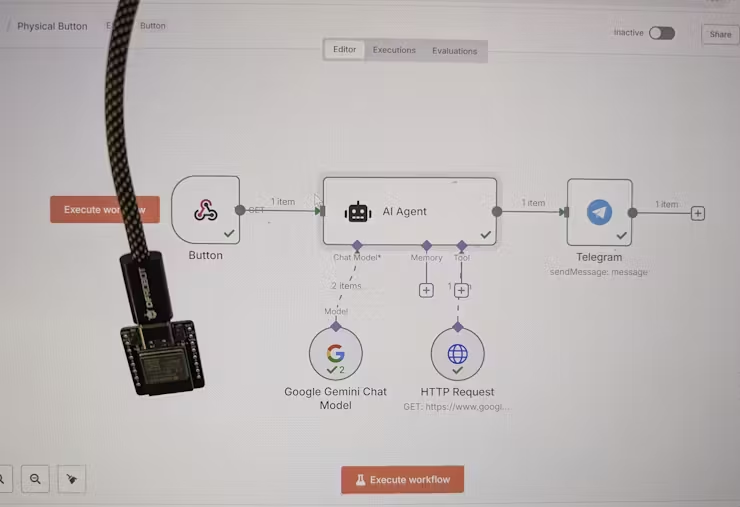
- The “Press for Pizza” Button:
- Hardware: An ESP32 board connected to a simple push button. When pressed, the ESP32 sends an HTTP POST request (a “webhook”) to a specific n8n URL.
- n8n Workflow:
- Trigger: Receives the webhook from the ESP32.
- Action 1: Sends a message to a group chat in Telegram (or Discord/Slack) with “Pizza time! Someone order please.”
- Action 2 (Optional): Could even trigger an order with a food delivery service API if I set that up!
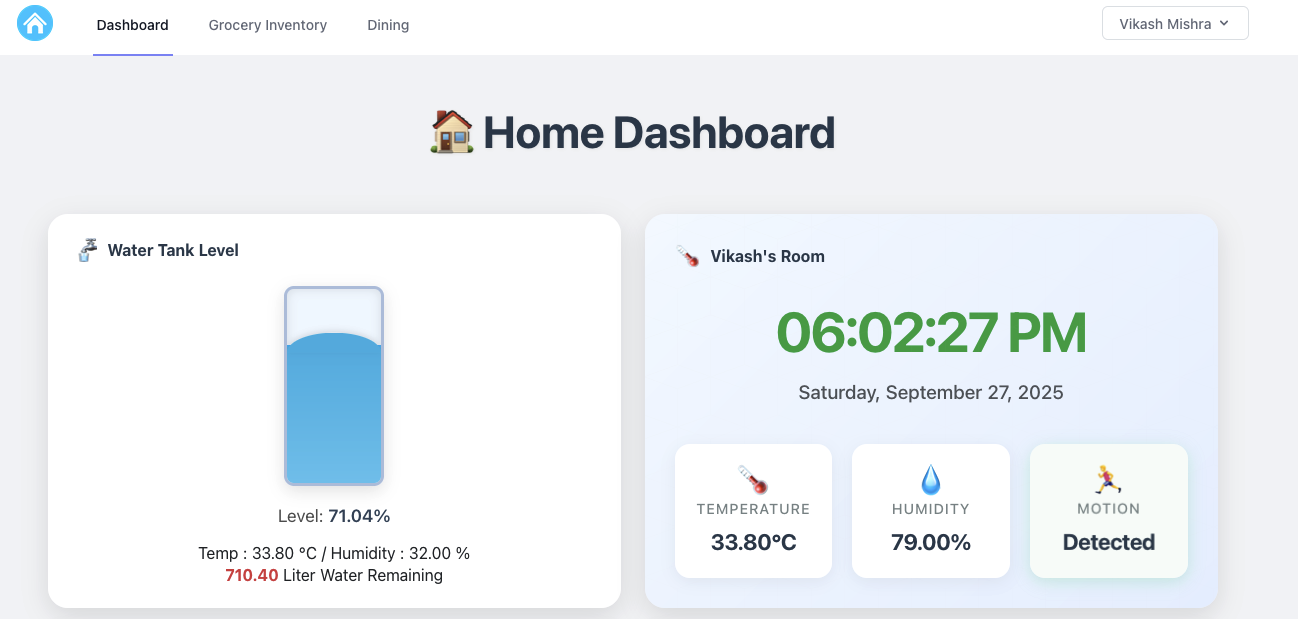
- Environment Monitor & Alert System:
- Hardware: An ESP32 connected to temperature/humidity sensors. It periodically (e.g., every 5 minutes) reads the sensor data and sends it via MQTT (a lightweight messaging protocol for IoT) to an MQTT broker that n8n is listening to.
- n8n Workflow:
- Trigger: Receives a new MQTT message from the ESP32.
- Action 1: Logs the temperature and humidity data to a Google Sheet or a local database for historical tracking.
- Action 2: If the temperature or humidity goes above/below a set threshold, it sends a notification to my phone or even toggles a smart plug (via Home Assistant) connected to a fan or humidifier.
The Impact: I can build truly custom smart home devices or physical interaction points, collecting real-world data and automating responses, all orchestrated visually through n8n! It’s incredibly satisfying to see these custom tools come to life.
Why n8n is Such a Powerful Addition to My Toolkit
If you’re feeling the push and pull of digital tasks like I was, n8n offers a compelling solution. I wholeheartedly recommend exploring it if you:
- Are tired of manual drudgery: It’s built for automating those repeatable tasks that drain your time and energy.
- Value privacy and control: The self-hosting option is a huge advantage for keeping your data in your hands.
- Want powerful automation without breaking the bank: Leverage the open-source community edition for free.
- Are keen to integrate AI into your routines: Its robust AI nodes (for LLMs like OpenAI, Gemini, Ollama) make it surprisingly easy to add intelligence to your workflows.
- Enjoy tinkering with hardware: The ability to seamlessly connect with microcontrollers like ESP32 opens up a world of physical automation.
- Find other “no-code” tools too restrictive: n8n offers a fantastic balance of visual building and underlying flexibility. There’s a learning curve, but the community and documentation are incredibly supportive.
For me, embracing n8n has been about much more than just saving time; it’s about gaining mental bandwidth and focusing on creative, impactful work. The ability to connect my office software, home devices, and even custom hardware projects under one automation umbrella is truly transformative.
Ready to Build Your Own Automated World?
If this resonates with you, I encourage you to check out n8n. Whether you start with their hosted cloud service or dive into self-hosting, you’re investing in a more efficient, less stressful digital future.
What repetitive tasks are you currently struggling with? Are you also interested in bridging the digital and physical with tools like ESP32? Share your thoughts and automation aspirations in the comments below!