
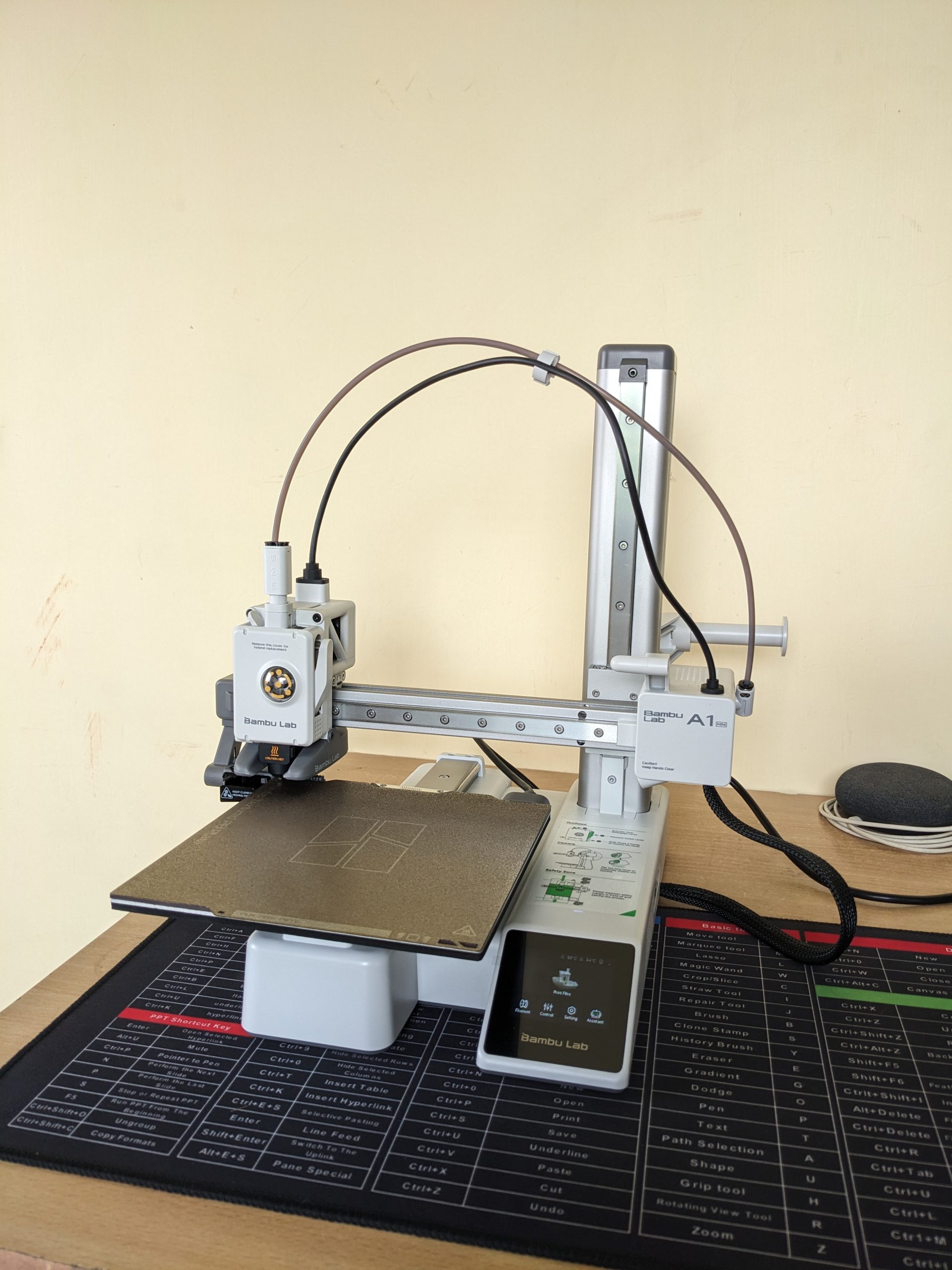
My First 3D Printer: Why I Chose the Bambu Lab A1 Mini (and How I Got It from Robu.in)

Bambu Lab A1 Mini Printer

Thinking about getting into 3D printing? If you’re anything like me, you’ve probably spent hours watching videos, reading reviews, and trying to figure out which printer is the best for a beginner. After a lot of research, I decided to pull the trigger on the Bambu Lab A1 Mini, and I’m so glad I did. I want to share my entire experience, from the moment I clicked “buy” on Robu.in to the moment the printer arrived at my doorstep.

Why the Bambu Lab A1 Mini is a Top Recommendation for Beginners

When I started my search, I knew I wanted a printer that was easy to use, reliable, and didn’t require constant tinkering. The Bambu Lab A1 Mini checked all those boxes and more. Here’s a quick rundown of what makes this printer stand out from the competition:

  • Effortless Setup and Calibration: This was a huge selling point for me. The A1 Mini has a fully automatic calibration system. It handles the bed leveling, Z-offset, vibration resonance, and pressure advance on its own. It’s a true “plug-and-play” experience, which is a massive relief for a first-timer.
  • Insane Speed: You’ll be amazed at how fast this printer is. With a maximum toolhead speed of 500textmm/s and an acceleration of 10,000textmm/s2, you can get your prints done in a fraction of the time compared to other entry-level printers. Less waiting means more creating!
  • Quiet Operation: One of the most common complaints about 3D printers is the noise. The A1 Mini’s active motor noise canceling feature makes it surprisingly quiet. This is great if you plan to have it in a shared living space or a home office.
  • Smart and Reliable: The printer is packed with sensors that prevent common printing failures. The filament run-out and tangle sensors, along with the power loss recovery feature, mean your prints are protected from unexpected issues.

In my opinion, the Bambu Lab A1 Mini is the perfect machine for anyone who wants to jump into 3D printing without the steep learning curve. It’s a solid investment that delivers on its promises.


My Experience Buying from Robu.in

As a maker in India, finding a reliable supplier for high-tech gadgets can be a challenge. I stumbled upon Robu.in and was immediately impressed by their extensive catalogue of electronics, robotics, and 3D printing supplies.

The website was easy to navigate, and finding the Bambu Lab A1 Mini was a breeze. The checkout process was straightforward, and they provided multiple secure payment options, which gave me confidence in my purchase.

Because my location is on the outskirts of the city, I expected the delivery to take a bit longer. However, the wait was completely worth it. The best part? The courier service. My package was handled by BlueDart, and I was really impressed with their service. Despite some online reviews mentioning mixed experiences, my personal delivery with them was great. The package was in perfect condition, and the delivery person was very professional and ensured it was handed over to me safely. This kind of reliable courier service is crucial when you’re buying a delicate and expensive piece of equipment.


What’s Next? Stay Tuned!

The printer is here, and I’m itching to get it unboxed and set up! I’m planning to document my entire experience, from the unboxing to my very first prints, on my new YouTube channel.

I’ll be sharing an in-depth unboxing video soon, where you’ll get a close-up look at the Bambu Lab A1 Mini and all its components. If you’re considering this printer, or just want to follow along on my 3D printing journey, be sure to subscribe to my new YouTube channel and hit the notification bell.

My experience with Robu.in and BlueDart has been excellent, and I can confidently recommend them. Now, it’s time to fire up this printer and see what it can do!
My Next DIY Obsession: From Smart Home to 3D Printing

IoT 3D Printing Banner

If you’ve followed my previous blog post, you’ll know I’ve been deep into building my own DIY smart home ecosystem. My goal is to create a fully customized, open-source-powered “brain of the house,” from automatic door locks to intelligent climate control. It’s been a rewarding challenge, but as my little IoT devices have multiplied, I’ve realized something: they’re not exactly winning any awards for style.

Right now, my creations are a mess of wires and circuit boards, functional but far from a finished product. I knew I needed to take the next step, to bridge the gap between tech-nerd-in-a-garage and home-automation-pro. That’s why I’m diving headfirst into the world of 3D printing. This isn’t just a new hobby; it’s the key to turning my chaotic prototypes into sleek, professional-looking devices.


The Plan: A Beginner’s Guide to My 3D Printing Journey

My journey is starting right at the beginning, and I’m sharing every step to help others who might be considering the same path.

Step 1: The Great Printer Hunt

This is probably the most crucial and overwhelming part. The sheer number of 3D printers on the market is mind-boggling! My top priority is finding an affordable, user-friendly FFF (Fused Filament Fabrication) printer that won’t require a degree in engineering to operate. I’m currently torn between popular beginner models like the Creality Ender 3 and the Bambu Lab A1, both known for their active communities and reliability.

Step 2: From Idea to Model

A 3D printer is just a fancy paperweight without a digital design. I’m already starting to explore 3D modeling software. For now, I’ll be using free, intuitive tools like Tinkercad to create simple enclosures for my IoT sensors. As I get more comfortable, I plan to tackle more advanced software like Fusion 360 to bring more complex designs to life. The feeling of designing something from scratch and watching it take shape layer by layer… that’s the dream.

Step 3: Picking the Perfect Plastic

Who knew there were so many types of plastic? I’m learning about different filaments and their uses. For a beginner, PLA (Polylactic Acid) seems to be the clear winner. It’s easy to work with, less prone to warping, and biodegradable—a great choice for my initial projects. Once I master PLA, I’ll move on to more durable materials like ABS for stronger, more robust enclosures.

Step 4: Time to Hit “Buy”

This is where the adventure truly begins! After weeks of research, I’ll finally be ready to purchase my first 3D printer and a few spools of filament. I’m also looking into essential accessories like a proper build plate and a good set of tools to ensure a smooth printing process.

Step 5: The First Print

My hands are already itching to hit the “print” button. I’ll probably start with something simple, maybe a small benchy or a basic enclosure for one of my temperature sensors. I know there will be failed prints and frustrating moments, but that’s all part of the fun of learning a new skill.


Beyond the Hobby: A Vision for the Future

This isn’t just a personal project. My goal is to use 3D printing to create professional, ready-to-use housings for my IoT devices. In the near future, I plan to make my custom 3D models and even the completed IoT devices available for purchase.

Just a heads-up: this blog post isn’t sponsored, but if any brands are looking for genuine, hands-on product reviews, I’d love to collaborate!

I’ll be documenting every step, from my first successful print to my inevitable failures. If you’re excited to follow along and learn with me, be sure to subscribe to my blog so you don’t miss any updates on my smart home and 3D printing journey. You can also catch up on my original plan for the DIY Smart Home Revolution here.

What kind of project would you love to create with a 3D printer? Let me know in the comments below!