Liberating My Digital Life: How I Use n8n for Daily Work, Home, and Building Tools with ESP32

n8n esp32

Hey everyone!

If you’re anything like me, your daily digital life probably feels like a never-ending juggling act. From managing work tasks and emails to keeping my home life organized and even dabbling in personal tech projects, there’s always something demanding my attention. I used to feel constantly overwhelmed by the sheer volume of repetitive actions: moving files, sending routine notifications, updating spreadsheets, or just wishing my various apps and even my home devices could talk to each other seamlessly.

I spent a lot of time searching for a better way. I tried individual app integrations, simple “if-this-then-that” services, but they always felt limited. They either couldn’t handle the complexity I needed, or their subscription costs quickly escalated as my automation ambitions grew.

Then, I discovered n8n. It wasn’t just another automation tool; it felt like finding a missing piece of my digital puzzle. When I heard it was “open-source” and “self-hostable,” I initially thought, “Oh, great, another complex setup.” But after diving in, I realized it was the perfect blend of power, flexibility, and control. n8n has truly revolutionized how I approach my daily work, manage my home life, and even build custom tools.

So, if you’re ready to take charge of your digital world and automate away the drudgery, let me show you how I’m using n8n to make my life simpler, smarter, and more integrated.


My Journey with n8n: Beyond Just Automation

At its core, n8n (pronounced “n-eight-n”) is an open-source, low-code workflow automation platform. For me, it translates into a few key benefits that resonate deeply with how I operate:

  • Financial Freedom: The fact that it’s free to use if you host it yourself is a massive advantage. I can build extensive automations without worrying about spiraling monthly bills, which is fantastic for personal projects and small-scale professional use.
  • Visual Simplicity, Deep Power: Building workflows in n8n is incredibly intuitive. You use a visual, drag-and-drop interface where each “node” represents an app, a service, or a specific action. You connect these nodes to create logical “workflows.” It’s like sketching out a flowchart, but then it actually executes your instructions. And if I ever need to get really specific, I can drop in a bit of JavaScript or Python, offering a level of flexibility rarely seen in other tools.
  • Complete Control & Privacy: The self-hosting option was a huge draw. It means my data, my credentials, and all my automation logic reside on my own server. This gives me unparalleled control and peace of mind regarding privacy, especially when dealing with personal or sensitive information. (For those who prefer not to manage a server, n8n also offers a convenient cloud service!)

My first successful workflow, connecting a form submission to a Google Sheet and sending a notification, felt like a small victory. But it quickly escalated into much more complex and satisfying projects.


How I Use n8n: Real-World Examples from Office, Home, and Beyond

Here are some actual workflows that run daily in my setup, impacting different facets of my life:

1. Office/Work Automation: My “Smart Admin Assistant”

Even in a personal capacity or managing a small business, administrative tasks can pile up. n8n helps me manage them with ease.

  • Automated Meeting Notes Trigger: When a meeting ends on my Google Calendar, n8n automatically creates a draft document in Notion or Google Docs with the meeting title, attendees, and a prompt for me to add notes.
  • Client Inquiry Management: Any inquiries from my service pages (using a tool like Typeform or a custom web form) are routed directly via n8n.
    • Action 1: Details are automatically added to a structured Google Sheet (my simple CRM).
    • Action 2: Urgent inquiries trigger a direct notification to my Slack or Telegram app.
    • Action 3: A personalized acknowledgment email is sent via Gmail or my marketing platform.

The Benefit: Less time on manual data entry and setup, more time focusing on productive work. I never miss a lead or forget to follow up.

2. Home Automation: The “Digital House Assistant”

n8n isn’t just for work! It’s fantastic for making my home life smoother.

  • Automated Bill & Subscription Tracker: I have n8n scanning specific email addresses for new bills or subscription notifications.
    • Action 1: It extracts key details (amount, due date, service) and logs them into a dedicated Google Sheet for financial overview.
    • Action 2: If a new subscription is detected or a large bill arrives, it sends me a notification on Telegram to review.
  • Smart Weather Alerts: Before I leave for the day, n8n tells me what to expect.
    • Trigger: Scheduled daily at 7 AM.
    • Action: Fetches weather data from OpenWeatherMap for my location. If rain is predicted or the temperature is outside my comfort zone, it sends a message to my smart speaker (via an integration like Home Assistant) and my phone, advising me to carry an umbrella or a jacket.

The Benefit: Better financial oversight and no more unexpected downpours!

3. Building Tools: Interacting with the Physical World using ESP32

This is where n8n gets really exciting for me – bridging the digital and physical. I’ve been experimenting with ESP32 microcontrollers (those tiny, affordable Wi-Fi enabled boards) to create custom IoT solutions, and n8n is the perfect backend.

  • The “Press for Pizza” Button:
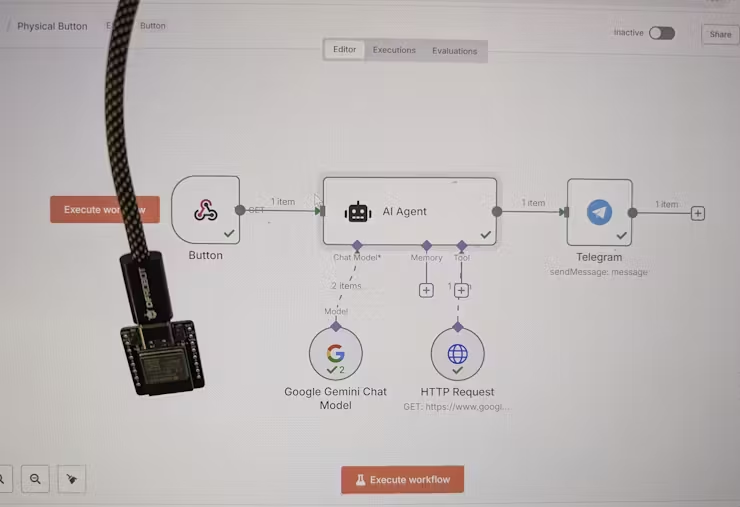
    • Hardware: An ESP32 board connected to a simple push button. When pressed, the ESP32 sends an HTTP POST request (a “webhook”) to a specific n8n URL.
    • n8n Workflow:
      • Trigger: Receives the webhook from the ESP32.
      • Action 1: Sends a message to a group chat in Telegram (or Discord/Slack) with “Pizza time! Someone order please.”
      • Action 2 (Optional): Could even trigger an order with a food delivery service API if I set that up!
  • Environment Monitor & Alert System:
    • Hardware: An ESP32 connected to temperature/humidity sensors. It periodically (e.g., every 5 minutes) reads the sensor data and sends it via MQTT (a lightweight messaging protocol for IoT) to an MQTT broker that n8n is listening to.
    • n8n Workflow:
      • Trigger: Receives a new MQTT message from the ESP32.
      • Action 1: Logs the temperature and humidity data to a Google Sheet or a local database for historical tracking.
      • Action 2: If the temperature or humidity goes above/below a set threshold, it sends a notification to my phone or even toggles a smart plug (via Home Assistant) connected to a fan or humidifier.

The Impact: I can build truly custom smart home devices or physical interaction points, collecting real-world data and automating responses, all orchestrated visually through n8n! It’s incredibly satisfying to see these custom tools come to life.


Why n8n is Such a Powerful Addition to My Toolkit

If you’re feeling the push and pull of digital tasks like I was, n8n offers a compelling solution. I wholeheartedly recommend exploring it if you:

  • Are tired of manual drudgery: It’s built for automating those repeatable tasks that drain your time and energy.
  • Value privacy and control: The self-hosting option is a huge advantage for keeping your data in your hands.
  • Want powerful automation without breaking the bank: Leverage the open-source community edition for free.
  • Are keen to integrate AI into your routines: Its robust AI nodes (for LLMs like OpenAI, Gemini, Ollama) make it surprisingly easy to add intelligence to your workflows.
  • Enjoy tinkering with hardware: The ability to seamlessly connect with microcontrollers like ESP32 opens up a world of physical automation.
  • Find other “no-code” tools too restrictive: n8n offers a fantastic balance of visual building and underlying flexibility. There’s a learning curve, but the community and documentation are incredibly supportive.

For me, embracing n8n has been about much more than just saving time; it’s about gaining mental bandwidth and focusing on creative, impactful work. The ability to connect my office software, home devices, and even custom hardware projects under one automation umbrella is truly transformative.


Ready to Build Your Own Automated World?

If this resonates with you, I encourage you to check out n8n. Whether you start with their hosted cloud service or dive into self-hosting, you’re investing in a more efficient, less stressful digital future.

What repetitive tasks are you currently struggling with? Are you also interested in bridging the digital and physical with tools like ESP32? Share your thoughts and automation aspirations in the comments below!


My Secret Weapon: Truly Open-Source Tools That Boost My Productivity (No Hidden Costs!)

Open Source

Hey everyone!

If you’re anything like me – a busy freelancer or just someone who wants to make the most of their time – productivity is always top of mind. And over the years, I’ve learned that you don’t need to spend a fortune on fancy software subscriptions to get top-tier functionality. In fact, some of the most powerful and flexible tools out there are completely open source.

For me, choosing open source isn’t just about saving money (though that’s a huge plus!). It’s about having more control, supporting community-driven projects, and often, enjoying a level of transparency you just don’t get with proprietary tools. Plus, many of them can be hosted on your own computer or server, giving you ultimate data ownership.

I’ve spent a lot of time sifting through options, and I’ve learned that not all “open source” is created equal, especially when it comes to free features. So, I’ve curated a list of my absolute favorites – tools where the core functionality is truly open and accessible without constantly nudging you towards a paid plan. I’ve also made sure to pick projects with robust, independent communities that prioritize user trust and security, giving you a quick look at their origins and my thoughts on their pros and cons. And yes, I’ve included some fantastic projects from right here in India at the top of their respective categories!

Ready to see how I supercharge my daily workflow without breaking the bank? Let’s dive in!


Keeping My Projects on Track: The Organizers I Trust

Managing my projects, tasks, and deadlines is a constant balancing act. These open-source project management tools are truly fantastic for keeping everything in order:

  • ERPNext
    • Origin: Developed by Frappe Technologies, a company based in India. It’s a comprehensive ERP system, but its project module is robust enough for standalone project management.
    • My Experience: While it’s a full ERP, I’ve found its project management module incredibly powerful. It integrates well with other business functions if you ever need them, making it a great long-term solution.
    • Pros: Very comprehensive project management features (tasks, milestones, timesheets, billing), highly customizable, integrates with accounting and CRM, strong Indian developer community.
    • Cons: Can be overwhelming if you only need a simple task list, setup requires a server and some technical understanding.
    • Check it out: https://erpnext.com/
    • Dive into the code: https://github.com/frappe/erpnext
  • Taiga
    • Origin: Developed by Kaleidos, a company based in Spain. It emerged from a desire for a user-friendly, open-source agile project management tool.
    • My Experience: When I need an agile project management tool that truly shines with Kanban and Scrum, Taiga is my go-to. It’s incredibly intuitive and visually appealing.
    • Pros: Beautiful and intuitive UI, strong support for Scrum and Kanban, excellent for agile teams and personal projects, very active development, good community edition features.
    • Cons: Can be a bit overkill for extremely simple task lists, setup for self-hosting might require some technical knowledge.
    • Check it out: https://www.taiga.io/
    • Dive into the code: https://github.com/taigaio
  • Vikunja
    • Origin: Primarily developed by a single maintainer in Germany with contributions from a growing open-source community.
    • My Experience: This is a modern, self-hostable to-do app that I absolutely love for organizing tasks within projects. It offers various views like lists, Gantt, table, and Kanban.
    • Pros: Modern and clean interface, privacy-focused (self-hostable), rich task management features, actively developed.
    • Cons: Newer project compared to some, so community support might be smaller, more advanced features might require self-hosting for full benefit.
    • Learn more: https://vikunja.io/
    • Their GitHub: https://github.com/go-vikunja/vikunja
  • Focalboard
    • Origin: Developed by the Mattermost team (a US-based company known for its open-source communication platform).
    • My Experience: If you’re looking for a simple yet effective Trello-style task board, Focalboard is a great open-source option. It provides excellent task management capabilities, especially for visual thinkers.
    • Pros: Simple and intuitive Kanban boards, easy to get started, can integrate with Mattermost if you use it, self-hostable.
    • Cons: More focused on visual boards, less comprehensive than full-fledged project management systems, lacks advanced features like Gantt charts out of the box.
    • Official Site: https://focalboard.com/
    • GitHub: https://github.com/mattermost/focalboard

Capturing Every Thought: My Note-Taking and Knowledge Powerhouses

I can’t afford to lose any of my random brilliant ideas (or even the not-so-brilliant ones!). These open-source note-taking tools are my digital brainstorming and memory partners:

  • Joplin
    • Origin: Created by a developer based in France and maintained by a global open-source community.
    • My Experience: This is my primary note-taking and to-do application. Joplin is packed with features, supports Markdown, allows for tagging, and can sync with various cloud services. It’s “offline-first,” which is a huge plus!
    • Pros: Cross-platform (desktop, mobile, terminal), robust Markdown support, excellent syncing options, strong community, “offline-first” reliable.
    • Cons: Interface can feel a bit utilitarian for some, doesn’t have a web client for direct access without syncing.
    • Get Joplin: https://joplinapp.org/
    • Their repository: https://github.com/laurent22/joplin
  • Anytype
    • Origin: Developed by Anytype Inc., a company with a strong focus on privacy and open-source principles, based in Gibraltar.
    • My Experience: I’m truly impressed by Anytype. It’s a versatile, local-first app that allows you to create a personalized knowledge base, journal, habit tracker, and so much more.
    • Pros: Highly flexible and customizable (build your own “types”), local-first with strong encryption, focus on data ownership and privacy, modern interface.
    • Cons: Still in active development with rapid changes, the “building blocks” approach might have a learning curve, currently in an early access phase (though widely used).
    • Check out Anytype: https://anytype.io/
    • Their code base: https://github.com/anytype-io/anytype
  • Standard Notes
    • Origin: Developed by Standard Notes, Inc., a company based in the United States.
    • My Experience: When security and simplicity are paramount, Standard Notes is fantastic. It offers end-to-end encrypted note-taking across all devices.
    • Pros: Excellent end-to-end encryption by default, minimalist and distraction-free, cross-platform, very stable and reliable.
    • Cons: Free version is quite basic (focus on text notes), more advanced features like rich text or editors require a paid subscription (though the core note-taking is fully open).
    • Discover Standard Notes: https://standardnotes.com/
    • Their GitHub: https://github.com/standardnotes/app

Staying Connected: My Free & Open Communication Hubs

Effective communication is the backbone of successful freelance work. These open-source platforms help me stay connected without any premium feature paywalls:

  • Zulip
    • Origin: Started at MIT and now developed by a company based in the United States, with a large, active open-source community.
    • My Experience: I find Zulip to be incredibly well-designed for asynchronous conversations. Its unique threading keeps discussions clear and focused, which is a lifesaver in client communications.
    • Pros: Unique topic-based threading for organized discussions, powerful search, highly customizable, good for large teams or detailed conversations, self-hostable.
    • Cons: Can have a slight learning curve if you’re used to traditional flat chat, interface might feel busy for some.
    • Explore Zulip: https://zulip.com/
    • Their GitHub: https://github.com/zulip/zulip
  • Mattermost
    • Origin: Developed by Mattermost, Inc., a company based in the United States.
    • My Experience: If you’re after a powerful, self-hostable team communication platform similar to Slack, Mattermost is an excellent choice. Its open-source edition provides a rich set of features for direct messages, private groups, and public channels.
    • Pros: High degree of control and customization (self-hostable), secure and private, rich feature set for team collaboration, active development.
    • Cons: Can be resource-intensive for self-hosting, interface might feel less polished than some commercial alternatives, best suited for those comfortable with server management.
    • Learn about Mattermost: https://mattermost.com/
    • Their repository: https://github.com/mattermost/mattermost
  • Jitsi Meet
    • Origin: Originally developed by Jitsi, a project started at the University of Strasbourg, France, and now part of 8×8, Inc. (a US-based company) but still actively maintained as open source.
    • My Experience: For video conferencing, Jitsi Meet is my top pick. It’s completely free, open source, and self-hostable, offering secure and high-quality video calls directly through your browser.
    • Pros: No accounts needed for basic use, strong privacy focus, self-hostable for full control, good audio and video quality, screen sharing.
    • Cons: Reliability can sometimes vary depending on internet connection and server load (especially public servers), feature set is more basic compared to enterprise-grade video conferencing.
    • Official Site: https://jitsi.org/jitsi-meet/
    • GitHub: https://github.com/jitsi/jitsi-meet

My Digital Filing Cabinet: File Management & Storage Freedom

Keeping my files accessible, secure, and perfectly organized is paramount. These open-source solutions ensure my digital life is always in order:

  • Nextcloud
    • Origin: Developed by Nextcloud GmbH, a company based in Germany, founded by former ownCloud developers. It has a massive global community.
    • My Experience: I honestly can’t recommend Nextcloud enough. It’s more than just file storage; it’s a complete self-hosted productivity platform.
    • Pros: Comprehensive suite (files, calendar, contacts, notes, video calls via apps), excellent control over your data (self-hostable), active development, vast ecosystem of apps.
    • Cons: Can be complex to set up and maintain for beginners on a self-hosted server, performance depends heavily on your server hardware and internet connection.
    • Dive into Nextcloud: https://nextcloud.com/
    • Their GitHub: https://github.com/nextcloud
  • Paperless-ngx
    • Origin: A community-driven fork of the original “Paperless” project, with contributors from various countries, prominently from Europe and North America.
    • My Experience: This is a fantastic tool for turning your physical documents into a searchable digital archive. Paperless-ngx automatically indexes, tags, and organizes your scanned documents, making them fully searchable.
    • Pros: Automates document organization, powerful OCR for full-text search, self-hostable, clean interface, reduces physical paper clutter.
    • Cons: Requires initial setup and understanding of Docker/server environments, requires a scanner for physical documents.
    • Official Site: https://docs.paperless-ngx.com/
    • GitHub: https://github.com/paperless-ngx/paperless-ngx
  • Mayan EDMS
    • Origin: Developed by Mayan EDMS LLC, a company based in the United States, with a strong open-source community behind it.
    • My Experience: For more sophisticated document management needs, Mayan EDMS is a free and open-source electronic document management system. It’s a robust choice for storing, categorizing, and managing documents.
    • Pros: Feature-rich for serious document management (OCR, versioning, workflows), highly scalable, robust security features, self-hostable.
    • Cons: Can be complex to set up and configure for individual users due to its enterprise-grade nature, has a steeper learning curve than simpler tools.
    • Official Site: https://www.mayan-edms.com/
    • GitHub: https://gitlab.com/mayan-edms/mayan-edms

Getting Paid & Tracking Time: My Financial Freedom Fighters

As a freelancer, accurate invoicing and time tracking are crucial. These open-source options keep my finances streamlined without any “premium feature” traps:

  • InvoicePlane
    • Origin: Initiated by a developer in Germany and actively maintained by a community of contributors.
    • My Experience: When it comes to managing my quotes, invoices, clients, and payments, InvoicePlane is an excellent self-hosted open-source application. It provides a complete billing cycle management solution.
    • Pros: Comprehensive invoicing and client management, easy to self-host, clean and functional interface, supports multiple languages and currencies.
    • Cons: Development pace can be slower compared to commercially backed projects, mobile responsiveness could be improved.
    • Official Site: https://www.invoiceplane.com/
    • GitHub: https://github.com/InvoicePlane/InvoicePlane
  • Kimai
    • Origin: Developed by a core team based in Germany with contributions from a global community.
    • My Experience: For time tracking, I often recommend Kimai. It’s a super flexible, open-source time-tracker designed for freelancers and teams. It easily tracks work time, generates detailed reports, and even offers invoicing features.
    • Pros: Flexible time tracking (projects, activities, customers), powerful reporting, integrates with invoicing, self-hostable, active development.
    • Cons: Setup for self-hosting can be more involved for non-technical users, mobile app experience is primarily web-based.
    • Official Site: https://www.kimai.org/
    • GitHub: https://github.com/kimai/kimai

Fortifying My Digital Locks: Password Management You Can Trust

I can’t emphasize this enough: strong password hygiene is absolutely essential! These open-source password managers keep my credentials safe and sound, with no hidden catches:

  • Bitwarden
    • Origin: Developed by Bitwarden, Inc., a company based in the United States, committed to open source.
    • My Experience: This is my top recommendation for password management. Bitwarden is a highly respected open-source solution that allows you to store, generate, and autofill strong passwords securely.
    • Pros: Excellent cross-platform support, robust security features (zero-knowledge encryption), easy to use, free tier is very generous, self-hosting option for server components.
    • Cons: Cloud-hosted free tier has some minor limitations (e.g., no TOTP sync without premium), self-hosting requires some technical know-how.
    • Official Site: https://bitwarden.com/
    • GitHub: https://github.com/bitwarden
  • KeePassXC
    • Origin: A community-driven fork of the original KeePass project, with a decentralized global developer community.
    • My Experience: If you prefer an entirely offline and locally stored password manager, KeePassXC is fantastic. It stores your passwords in an encrypted database on your own computer.
    • Pros: Extremely secure (offline storage), no cloud dependency, cross-platform, robust features like auto-type and SSH agent integration, audited code.
    • Cons: No built-in cloud sync (requires manual sync or third-party tools), less convenient for quick mobile access compared to cloud-synced solutions.
    • Official Site: https://keepassxc.org/
    • GitHub: https://github.com/keepassxreboot/keepassxc

Visualizing My Thoughts: Mind Mapping for Clarity

Sometimes, the best way to untangle a complex idea or plan a new project is to visualize it. These open-source mind mapping tools are perfect for that:

  • WiseMapping
    • Origin: A collaborative open-source project with developers from various countries, primarily from Europe and North America.
    • My Experience: For a free, web-based open-source mind mapping tool that allows for collaboration and sharing, WiseMapping is brilliant. It’s simple, intuitive, and gets the job done without any fuss.
    • Pros: Web-based (accessible anywhere), collaborative features, simple and clean interface, no installation required.
    • Cons: More basic in terms of advanced features compared to desktop apps, requires internet connection for primary use.
    • Official Site: https://www.wisemapping.com/
    • GitHub: https://github.com/WiseMapping/WiseMapping
  • Freeplane
    • Origin: Developed by a global open-source community, spun off from the FreeMind project.
    • My Experience: If you prefer a powerful, feature-rich mind-mapping experience as a desktop application, Freeplane is an excellent choice. It helps you organize information, brainstorm, and structure knowledge effectively.
    • Pros: Highly feature-rich and customizable, excellent for complex mind maps, supports various formats, active community.
    • Cons: Desktop-only (no web or mobile client), interface can feel a bit dated, might have a learning curve for beginners due to its extensive features.
    • Official Site: https://www.freeplane.org/
    • GitHub: https://github.com/freeplane/freeplane

My Takeaway: Why Open Source is the Way to Go

I truly believe that embracing open-source tools has been a game-changer for my freelance business and personal productivity. Here’s why I advocate for it:

  • It’s Genuinely Free: No hidden fees, no “premium” features you really need. The core tools are truly free to use.
  • Transparency & Security: The code is open for anyone to inspect, which means greater trust and often a more secure experience.
  • Flexibility & Customization: You can often modify these tools to perfectly fit your unique workflow.
  • Strong Community Support: A vibrant community usually backs these projects, offering valuable help, documentation, and continuous development.
  • No Vendor Lock-in: You’re not beholden to a single company’s decisions or price changes.
  • True Data Ownership: With self-hosted options, your data stays with you, on your server, ensuring maximum privacy and control.

My journey with open-source tools has been incredibly rewarding. It’s not just about saving money; it’s about empowerment, control, and being part of a movement that prioritizes user freedom. I encourage you to explore these options, try them out, and discover how truly open source can transform your productivity too!

What are your favorite, truly open-source tools that you rely on? Share them in the comments below – I’m always looking for new gems!

Unleashing the Web’s Potential: Your Ultimate Guide to Collecting Data for Personal Projects with Selenium

Web scrapping

Unleashing the Web’s Potential: Your Ultimate Guide to Collecting Data for Personal Projects with Selenium

In today’s data-driven world, the ability to collect information from various online sources can unlock incredible possibilities for personal projects. Whether you’re a hobbyist developer, a budding data scientist, or simply someone with a burning idea, accessing structured web data can be the key to bringing your vision to life. While many websites offer powerful APIs for programmatic access, a vast ocean of information remains locked behind traditional web interfaces. That’s where web scraping and web automation tools like Selenium come in.

Selenium automation isn’t just for testing; it’s a dynamic framework that allows you to control web browsers, mimicking human interactions. Imagine being able to automatically navigate websites, click buttons, fill out forms, and extract precisely the data you need, all with code. This blog post will guide you through the essentials of using Selenium for data collection, covering popular programming languages and providing valuable insights to ensure your projects are both effective and ethical.

Navigating the Ethical Landscape of Web Scraping

Before we dive into the technicalities, it’s paramount to understand the ethical and legal boundaries of data extraction. Responsible web scraping is crucial to avoid potential issues and maintain the integrity of the web.

Key Ethical Guidelines for Web Scrapers:

  • Respect robots.txt: Always check a website’s robots.txt file (e.g., www.example.com/robots.txt). This file provides guidelines for web crawlers, indicating which parts of the site can and cannot be accessed. Adhering to these rules is a fundamental ethical practice.
  • Review Terms of Service (ToS): Many websites explicitly state their policies on automated data collection in their Terms of Service. Always read these to ensure your activities are permissible. Some ToS strictly prohibit scraping.
  • Avoid Overloading Servers: Send requests at a reasonable, human-like pace. Implement delays (e.g., time.sleep() in Python) between requests to prevent overwhelming the website’s server, which can lead to service disruption for other users.
  • Prioritize APIs: If a website offers a public API, use it! APIs are designed for efficient and permissioned data access, making them the most reliable and ethical method.
  • Be Transparent (User-Agent): Identify your scraper with a descriptive User-Agent string. This allows website administrators to contact you if necessary.
  • Do Not Scrape Private or Sensitive Data: Avoid collecting personally identifiable information (PII) or confidential data without explicit consent. Adhere to data privacy regulations like GDPR or CCPA.
  • Avoid Copyright Infringement: While factual data itself is generally not copyrightable, the way it’s presented (e.g., specific text, images, database structures) often is. Be mindful of copyright laws when collecting and using content. If you’re using collected data for publication, ensure you have the right to do so and always attribute sources.
  • Don’t Bypass Security Measures: Attempting to bypass CAPTCHAs, IP blocks, or other security features can be considered malicious and may have legal repercussions.

By following these principles, you can ensure your web data collection efforts are both productive and respectful.

Getting Started with Selenium Automation

Selenium WebDriver acts as a bridge between your code and a real web browser. To begin your journey into browser automation, you’ll need:

  1. Selenium WebDriver Library: This is the core library that provides the commands to control the browser. You’ll install this into your chosen programming language environment.
  2. Browser Driver: This is a specific executable file (e.g., ChromeDriver for Google Chrome, GeckoDriver for Mozilla Firefox) that allows Selenium to communicate with the browser. You must download the correct driver for your browser version and ensure your system can find it (either by placing it in your system’s PATH or by specifying its location in your code).

Once these prerequisites are in place, you’re ready to write your first automated data collection script!

1. Python with Selenium: The Agile Scraper’s Friend

Python is the go-to language for web scraping projects due to its clear syntax, vast ecosystem of data processing libraries, and a large, supportive community. It’s excellent for rapid development and tackling dynamic web content.

How to Start with Selenium Python:

  1. Install Python: Download and install Python from python.org.
  2. Install Selenium Library: Open your terminal or command prompt and run:Bashpip install selenium
  3. Download Browser Driver: Get the compatible ChromeDriver from the Chromium website or GeckoDriver for Firefox from the Mozilla GitHub releases. Place it in a directory accessible via your system’s PATH, or note its path for explicit use in your script.

Sample Code Snippet (Python):

This example demonstrates opening Google, searching for “Selenium web scraping,” and printing the page title.

Python

from selenium import webdriver
from selenium.webdriver.common.by import By
from selenium.webdriver.common.keys import Keys
import time

# --- Setup: Ensure your chromedriver is in your PATH or specify its path ---
# Option 1 (Recommended): If chromedriver is in your system's PATH
driver = webdriver.Chrome()

# Option 2: Specify the path to your chromedriver executable
# from selenium.webdriver.chrome.service import Service
# service = Service('C:/path/to/your/chromedriver.exe') # Adjust path for your OS
# driver = webdriver.Chrome(service=service)

try:
    # Navigate to a website
    driver.get("https://www.google.com")
    print(f"Page title: {driver.title}")

    # Find the search bar element by its 'name' attribute
    # You'll often use By.ID, By.CLASS_NAME, By.XPATH, By.CSS_SELECTOR for elements
    search_box = driver.find_element(By.NAME, "q")

    # Type a query and press Enter
    search_box.send_keys("Selenium web scraping" + Keys.RETURN)

    # Wait for the search results page to load (a simple, but often effective, delay)
    time.sleep(3) 

    print(f"New page title after search: {driver.title}")

    # Example of extracting data: Find all search result links (conceptual)
    # search_results = driver.find_elements(By.CSS_SELECTOR, "h3 a") # Adjust CSS selector as needed
    # for result in search_results:
    #     print(result.text + ": " + result.get_attribute("href"))

finally:
    # Always close the browser to release resources
    driver.quit()

Pros of Python with Selenium:

  • Ease of Use: Highly readable syntax makes it accessible for beginners in web automation.
  • Rich Libraries: Seamless integration with powerful data analysis libraries like Pandas and NumPy for post-scraping data processing.
  • Vibrant Community: Extensive documentation, tutorials, and community support for troubleshooting.
  • Versatility: Beyond scraping, Python can be used for backend development, machine learning, and more.

Cons of Python with Selenium:

  • Performance: Can be slower than compiled languages for very large-scale, high-frequency data collection.
  • Global Interpreter Lock (GIL): Limits true multi-threading for CPU-bound tasks, though asynchronous programming can enhance concurrency for I/O-bound scraping.

2. Java with Selenium: The Enterprise-Grade Solution

Java, a robust and platform-independent language, is a common choice for building large, scalable, and maintainable automation frameworks, particularly in enterprise environments.

How to Start with Selenium Java:

  1. Install Java Development Kit (JDK): Download and install a recent JDK version (e.g., OpenJDK).
  2. Install Build Tool (Maven/Gradle): These tools simplify dependency management.
  3. Set up an IDE: Use popular Integrated Development Environments like IntelliJ IDEA or Eclipse.
  4. Add Selenium Dependencies: In your pom.xml (for Maven) or build.gradle (for Gradle), include the Selenium Java dependency.
  5. Download Browser Driver: Obtain the compatible ChromeDriver or GeckoDriver, as described for Python.

Sample Code Snippet (Java with Maven):

First, add this to your pom.xml within the <dependencies> section:

XML

<dependency>
    <groupId>org.seleniumhq.selenium</groupId>
    <artifactId>selenium-java</artifactId>
    <version>4.21.0</version> </dependency>

Then, your Java code:

Java

import org.openqa.selenium.WebDriver;
import org.openqa.selenium.chrome.ChromeDriver;
import org.openqa.selenium.By;
import org.openqa.selenium.Keys;
import org.openqa.selenium.WebElement;

public class SeleniumJavaExample {
    public static void main(String[] args) {
        // --- Setup: Ensure your chromedriver is in your PATH or specify its path ---
        // Option 1 (Recommended): If chromedriver is in your system's PATH
        // System.setProperty("webdriver.chrome.driver", "chromedriver"); // Not strictly needed if in PATH

        // Option 2: Specify the exact path to your chromedriver executable
        System.setProperty("webdriver.chrome.driver", "/path/to/your/chromedriver"); // Adjust for your OS

        WebDriver driver = new ChromeDriver();

        try {
            // Navigate to Google
            driver.get("https://www.google.com");
            System.out.println("Page title: " + driver.getTitle());

            // Find the search bar
            WebElement searchBox = driver.findElement(By.name("q"));
            searchBox.sendKeys("Selenium web scraping" + Keys.RETURN);

            // Wait for results
            Thread.sleep(3000); // 3 seconds delay

            System.out.println("New page title after search: " + driver.getTitle());

        } catch (InterruptedException e) {
            e.printStackTrace();
        } finally {
            // Close the browser
            driver.quit();
        }
    }
}

Pros of Java with Selenium:

  • Robustness & Scalability: Ideal for building large, complex, and highly maintainable web scraping solutions.
  • Strong Typing: Helps catch errors during compilation, leading to more stable and predictable code.
  • Performance: Generally performs faster than interpreted languages for execution-heavy tasks.
  • Mature Ecosystem: Comprehensive IDEs and testing frameworks (e.g., JUnit, TestNG) for enterprise-grade development.

Cons of Java with Selenium:

  • Verbosity: Java code can be more verbose, requiring more lines of code for similar functionality compared to Python.
  • Steeper Learning Curve: Setting up and managing Java projects, especially with build tools, can be more challenging for beginners.
  • Less Agile for Quick Scripts: Not as well-suited for quick, disposable data gathering scripts.

3. Other Languages with Selenium: Expanding Your Horizon

Selenium WebDriver offers official bindings for a variety of other popular programming languages, allowing you to leverage your existing skill set or explore new options for automated web data extraction.

C# with Selenium

C# is Microsoft’s versatile language, extensively used with the .NET framework for Windows applications and web development.

  • How to start: Install Visual Studio, create a .NET project, and add the Selenium.WebDriver NuGet package. Download the appropriate browser driver.
  • Sample Code Snippet (C#):
using OpenQA.Selenium;
using OpenQA.Selenium.Chrome;
using System;
using System.Threading;

class SeleniumCSharpExample
{
    static void Main(string[] args)
    {
        // --- Setup: Chromedriver must be in PATH or path specified ---
        IWebDriver driver = new ChromeDriver(); // Assumes chromedriver is in PATH

        try
        {
            driver.Navigate().GoToUrl("https://www.google.com");
            Console.WriteLine($"Page title: {driver.Title}");

            IWebElement searchBox = driver.FindElement(By.Name("q"));
            searchBox.SendKeys("Selenium web scraping" + Keys.Return);

            Thread.Sleep(3000); // 3 seconds delay

            Console.WriteLine($"New page title: {driver.Title}");
        }
        finally
        {
            driver.Quit();
        }
    }
}
  • Pros: Deep integration with the .NET ecosystem, powerful IDE (Visual Studio), strong for developing desktop and web applications.
  • Cons: While .NET Core is cross-platform, its historical focus has been Windows. Less community emphasis on general web data collection compared to Python.

JavaScript (Node.js) with Selenium

JavaScript, powered by Node.js, is an excellent choice for full-stack developers looking to extend their skills to web automation. It’s particularly strong for handling asynchronous operations common in web interactions.

  • How to start: Install Node.js, initialize a new project (npm init), and install selenium-webdriver (npm install selenium-webdriver). Download the appropriate browser driver.
  • Sample Code Snippet (JavaScript):
const { Builder, By, Key, until } = require('selenium-webdriver');

async function runSeleniumScript() {
    // --- Setup: Chromedriver must be in PATH or path specified ---
    let driver = await new Builder().forBrowser('chrome').build(); // Assumes chromedriver is in PATH

    try {
        await driver.get('https://www.google.com');
        console.log(`Page title: ${await driver.getTitle()}`);

        let searchBox = await driver.findElement(By.name('q'));
        await searchBox.sendKeys('Selenium web scraping', Key.RETURN);

        await driver.sleep(3000); // 3 seconds delay

        console.log(`New page title: ${await driver.getTitle()}`);
    } finally {
        await driver.quit();
    }
}

runSeleniumScript();
  • Pros: Native to the web, allowing for shared knowledge between front-end and automation tasks. Excellent for asynchronous and event-driven data collection needs.
  • Cons: Debugging complex asynchronous flows can sometimes be challenging. The web scraping community for Node.js is growing but still not as extensive as Python’s.

Ruby with Selenium

Ruby is admired for its elegant syntax and the Ruby on Rails framework, making it a strong contender for expressive and concise automation scripts.

  • How to start: Install Ruby, then install the selenium-webdriver gem (gem install selenium-webdriver). Download the appropriate browser driver.
  • Sample Code Snippet (Ruby):
require 'selenium-webdriver'

# --- Setup: Chromedriver must be in PATH or path specified ---
driver = Selenium::WebDriver.for :chrome # Assumes chromedriver is in PATH

begin
  driver.navigate.to 'https://www.google.com'
  puts "Page title: #{driver.title}"

  search_box = driver.find_element(name: 'q')
  search_box.send_keys 'Selenium web scraping', :return

  sleep 3 # 3 seconds delay

  puts "New page title: #{driver.title}"

ensure
  driver.quit
end
  • Pros: Clean and concise syntax, fostering productive development. Strong support for test automation frameworks (e.g., Capybara, RSpec).
  • Cons: A smaller web scraping community compared to Python. Less widely adopted for general-purpose data collection projects.

R with Selenium

R is primarily used for statistical computing and data visualization. While less common for general web automation, it provides tools for direct web data extraction into an R environment for immediate analysis.

  • How to start: Install R and RStudio, then install the selenium and selenider packages (install.packages("selenium"); install.packages("selenider")). Ensure Java 17+ is installed. Download the appropriate browser driver.
  • Sample Code Snippet (R):
library(selenider)
library(dplyr) # For piping operations

# --- Setup: Chromedriver must be in PATH and Java 17+ installed ---
session <- selenider_session("selenium", browser = "chrome")

tryCatch({
  # Navigate to Google
  open_url(session, "https://www.google.com")
  cat("Page title:", elem_text(session %>% find_element("title")), "\n")

  # Find the search bar and type a query
  search_box <- session %>% find_element(css = "textarea[name='q']") # Google search box is often a textarea
  elem_send_keys(search_box, "Selenium web scraping", key = "return")

  # Wait for search results
  Sys.sleep(3) # 3 seconds delay

  cat("New page title:", elem_text(session %>% find_element("title")), "\n")

}, finally = {
  close_session(session)
})
  • Pros: Seamless integration with R’s powerful data analysis, statistical modeling, and visualization capabilities. Ideal for researchers and data scientists already proficient in R.
  • Cons: Not designed for broad general-purpose scripting. The web automation community in R is smaller compared to Python or Java.

Inspiring Personal Projects with Web Automation

With the power of Selenium automation at your fingertips, you can transform countless ideas into reality. Here are some popular web scraping project ideas that can be developed using these techniques:

  • E-commerce Price Tracker: Automatically monitor product prices across multiple online stores. Get alerts when prices drop or stock changes.
  • Real-time News Aggregator: Build a custom news feed by collecting headlines and articles from various news outlets based on your specific interests or keywords.
  • Job Board Scraper: Automate the search for relevant job postings from different job sites, filter them by criteria, and store them in a manageable format.
  • Sports Statistics Collector: Gather game results, player statistics, and team standings from sports websites for personal analysis or fantasy league insights.
  • Real Estate Market Analysis Tool: Collect property listings, pricing data, and neighborhood information to analyze trends or find ideal rental/purchase opportunities.
  • Event Calendar Builder: Scrape event details (date, time, location, description) from local venue websites, community pages, or ticketing sites.
  • Social Media Activity Monitor (Public Data): (Always respecting platform ToS) Track public engagement metrics for specific public profiles or trends.
  • Academic Research Assistant: Automate the collection of publicly available research paper metadata or abstracts from academic databases.
  • Online Course Availability Notifier: Get automatic notifications when a specific online course opens for enrollment or a new batch begins.
  • Review Sentiment Analyzer: Scrape product reviews from e-commerce sites or movie reviews from entertainment platforms to perform sentiment analysis.

Remember, the key to successful web data collection is to start small, understand the target website’s structure, and diligently adhere to ethical guidelines. By mastering Selenium, you’re not just automating tasks; you’re unlocking a world of data for your personal innovation. Get started today and see what incredible projects you can build!

Welcome to the Official Hub of Vikash Mishra: A Fresh Start in Blogging!

Welcome to VIKASH MISHRA's Blog

Hello and a very warm welcome to my official blogging site! This isn’t just another platform; it’s a dedicated space where I’ll be sharing my insights, experiences, and thoughts, marking a fresh start for my online presence. To give this new journey my full focus, I’ve consolidated and removed all my previous blog posts from other websites. This means you’re getting exclusive, new, and updated content right here.

Who Am I? Decoding Vikash Mishra

For those of you who are new to my work or have followed me across different platforms, allow me to reintroduce myself. I am Vikash Mishra, and my professional journey has been a dynamic blend of leadership, innovation, and strategic consulting in the technology sector.

Currently, I proudly serve as the CEO at M/s VIKASH TECH (https://vikashtech.com). At VIKASH TECH, we’re dedicated to pushing the boundaries of technological solutions, providing cutting-edge services that empower businesses to thrive in the digital age. My role here involves steering the company’s vision, fostering innovation, and ensuring we deliver exceptional value to our clients.

In addition to my role at VIKASH TECH, I also hold the position of COO at Mutiny India Private Limited (https://mutinyindia.com). Mutiny India is a testament to disruptive thinking and strategic execution, and as COO, I’m deeply involved in optimizing operations, driving growth, and ensuring our innovative projects come to fruition.

Beyond these leadership roles, I operate as an independent IT consultant. This allows me to leverage my extensive technical expertise and strategic acumen to assist various organizations in navigating complex IT challenges, optimizing their infrastructure, and securing their digital assets.

My career has provided me with a wealth of practical experience. I’ve had the distinct honor of working with prominent Indian institutions such as Indian Railways and BSNL, contributing to critical infrastructure and telecommunications projects. My journey also includes a significant tenure with ITC Limited, a diversified conglomerate, where I gained invaluable insights into various business verticals and large-scale operations. These diverse experiences have not only sharpened my technical skills but also broadened my understanding of the intricate relationship between technology, business strategy, and operational efficiency.

What to Expect: My Blogging Philosophy

You might notice that I’m what you’d call a “slow blogger.” This isn’t due to a lack of ideas, but rather a commitment to quality and depth. I believe in crafting content that is thoroughly researched, thoughtfully composed, and genuinely valuable to my readers. My blog posts will not be daily updates, but rather well-considered articles that delve deep into subjects I’m passionate about.

My primary focus areas for this blog will include:

  • Business: Exploring the intersection of technology and business strategy, leadership, entrepreneurial insights, and market trends.
  • Technology: Discussing emerging technologies, digital transformation, cloud computing, and the impact of innovation on various industries.
  • Network Management & Network Security: Sharing best practices, insights into robust network architectures, cybersecurity threats, and defense mechanisms.
  • Linux: Diving into the power and versatility of Linux, from system administration to open-source development.
  • Hardware: Occasionally exploring the nuances of various hardware components, their functionality, and their role in modern computing.

Don’t Miss Out: Stay Connected!

Given my deliberate posting schedule, it’s easy to miss an update. To ensure you don’t miss out on any valuable insights, I highly encourage you to sign up for notifications. By subscribing, you’ll receive an email alert whenever a new blog post goes live, allowing you to stay informed and engaged with the latest content.

This blog is more than just a collection of articles; it’s a platform for discussion, learning, and sharing knowledge. I invite you to read, reflect, and share your thoughts in the comments section. Your engagement is what makes this community thrive.

Thank you for joining me on this exciting new chapter. I look forward to connecting with you and sharing this journey of exploration in business, technology, and beyond.